Operation
Trip computer
In this manual: Operation
~1min read
The journey computer is convenient to use during trips.
1. Open the main menu.
2. Open the "Navigation" menu.
On vehicles without navigation system: open the "On-board info" menu.
3. Select "On-board info" and press the controller.
4. Select "Journey computer" and press the controller.
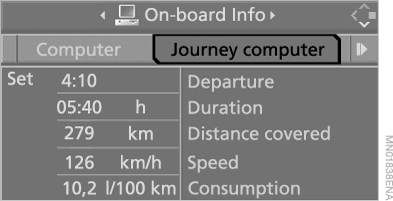
► Departure – departure time
► Duration – elapsed time
► Distance covered – distance traveled
► Speed – average vehicle speed
► Consumption – average fuel consumption
Switching the journey computer on/off and resetting all values:
1. Select "Set" and press the controller.
2. Select the desired menu item.
3. Press the controller.
Test yourself
A quick BMW X5 quiz: every answer comes with an explanation and a link to the manual page.
Was this page helpful?