Entering the inspection and emissions test due dates
For the CBS (Condition Based Service) indicator to function correctly, the date must be set correctly on the control display.
1. Open the home screen.
2. Press the controller to go to the menu .
3. Select "Service" and press the controller.
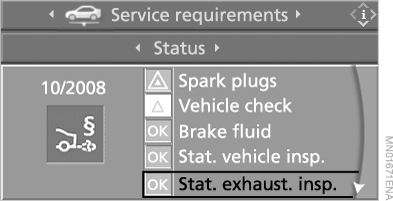
4. Select "Service requirements" and press the controller.
5. Select "Status" and press the controller.
6. Select "Stat. exhaust. insp." (Emissions test status) or "Stat. vehicle insp." (Vehicle inspection status) and press the controller.
7. Select "Schedule date for service" and press the controller. The month entry field is highlighted.
8. To set the desired value, turn the controller.

9. Press the controller to confirm the setting. The year entry field is highlighted.
10. Turn the controller to set the required value.
11. Press the controller to confirm the setting. The entered date is stored in memory.
To exit the menu, select and press the controller.
Test yourself
A quick BMW X5 quiz: every answer comes with an explanation and a link to the manual page.