Navigation DVDs
The navigation system uses special navigation DVDs. Different DVDs are used for the "Professional" and "Business" navigation systems. The latest disc versions are available at a BMW service center.
"Professional" Navigation System
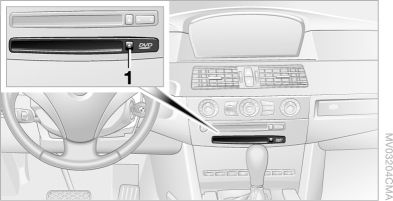
The lower disc drive is intended for navigation DVDs.
"Business" navigation system
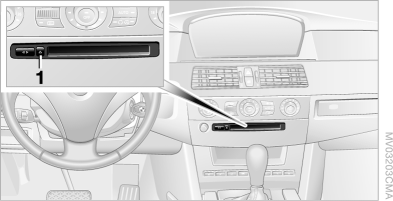
Common drive for navigation DVDs and audio CDs.
All information required to guide you to a specific destination is loaded into the navigation system memory when the route is calculated.
Therefore, during route guidance you can remove the navigation DVD and insert an audio CD into the drive. When the system needs new data from the navigation DVD, a corresponding message appears on the control display.
If the navigation DVD is replaced, a destination not saved in memory is deleted.
Inserting the Navigation DVD
1. Insert the DVD into the drive with the label facing up.
2. Wait a few seconds, as the system requires some time to read the disc contents.
Removing the Navigation DVD
1.  Press button 1.
The navigation DVD is ejected from the disc drive.
2. Remove the disc.
If the DVD does not eject from the drive, it may be jammed inside the drive.
Test yourself
A quick BMW X5 quiz: every answer comes with an explanation and a link to the manual page.