Personalizing settings
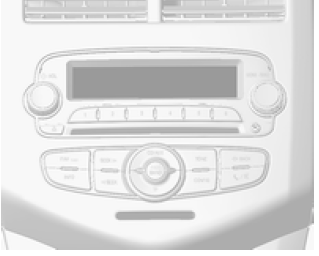
The vehicle settings can be personalized by changing parameters on the Board-Info-Display (BID).
Depending on the equipment version, some of the functions described below may not be available.
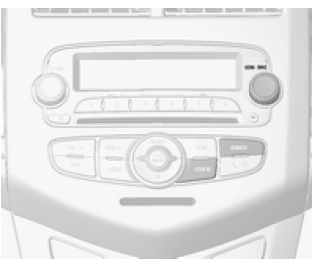
Press the CONFIG button with the ignition and the audio-navigation system on.
The settings menu is displayed.
Use the MENU knob to scroll through the settings menus.
To select a settings menu, press the MENU button.
To exit the menu or return to the previous one, press the BACK button.
The following menus can be displayed:
- Languages
- Time and date
- Radio settings
- Bluetooth settings
- Vehicle settings
Language settings
Changing the language.
Time and date settings
Audio Navigation System
Radio settings
Audio Navigation System
Bluetooth settings
Audio Navigation System
Vehicle settings
- Comfort settings Warning chime volume: Changes the volume of the warning chime.
Automatic rear wiper in reverse: Turns the rear wiper on or off when reverse gear is engaged.
- Parking Assist / Collision Detection System Parking Assist: Turns the ultrasonic sensors on or off.
- Ambient lighting Exterior lights when unlocking: Turns the entry lighting on or off.
Exit lighting duration: Turns the exit lighting on or off and changes how long the lighting stays on.
- Power door locks Automatic door unlock: Turns automatic door unlocking on or off when the doors are automatically locked. Also changes the unlock setting: unlock all doors or only the driver's door. Automatic door lock: Turns automatic door locking on or off while driving. Door lock inhibit when door is open: Turns the driver's door lock inhibit on or off when the door is open. If off is selected, the door lock delay menu is available. Door lock delay: Turns the door lock delay on or off. When the central lock button is pressed, three warning signals sound to indicate that the lock delay is active.
This function delays locking of the doors by five seconds after the last door is closed.
- Remote lock and unlock Remote unlock confirmation: Turns the light confirmation for unlocking on or off. Remote lock confirmation: Turns the light and/or audible confirmation for locking on or off. Remote door unlock: Changes the unlock setting: unlock all doors or only the driver's door.
Automatic door re-lock: Turns the automatic door locking function on or off if the doors are not opened after unlocking.
Restoring factory settings
Restores the original settings of all functions.
Test yourself
A quick Chevrolet Aveo quiz: every answer comes with an explanation and a link to the manual page.