Rear Vision Camera (RVC)
The vehicle may have an RVC system. Read this entire section before using it.
The RVC can assist the driver when backing up by displaying a view of the area behind the vehicle.
Always check behind and around the vehicle before backing
An image appears on the radio screen with the message Check Surroundings for Safety when the vehicle is shifted into R (Reverse).
The radio screen goes to the previous screen after approximately 10 seconds once the vehicle is shifted out of R (Reverse).
To see the previous screen sooner, do one of the following:
- Press a hard key on the infotainment system.
- Shift into P (Park).
- Reach a vehicle speed of 8 km/h.
Rear Vision Camera Location
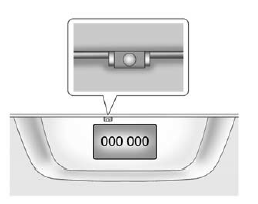
The camera is above the license plate.
The area displayed by the camera is limited.
It does not display objects that are close to either corner or under the bumper and can vary depending on vehicle orientation or road conditions. Displayed images may be farther or closer than they appear.
The following illustrations show the field of view that the camera provides.
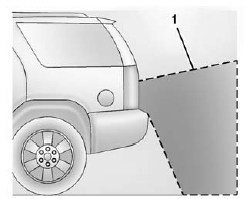
- View displayed by the camera.
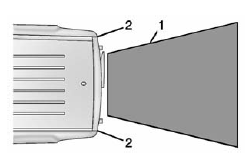
- View displayed by the camera.
- Corner of the rear bumper.
When the System Does Not Seem To Work Properly
The RVC system may not work properly or display a clear image if:
- It is dark.
- The sun or the beam of headamps is shining directly into the camera lens.
- Ice, snow, mud, or anything else builds up on the camera lens.
Clean the lens, rinse it with water, and wipe it with a soft cloth.
- The back of the vehicle is in an accident. The position and mounting angle of the camera can change or the camera can be affected. Be sure to have the camera and its position and mounting angle checked at your dealer.
- There are extreme temperature changes.
Test yourself
A quick Chevrolet Captiva quiz: every answer comes with an explanation and a link to the manual page.