Chevrolet Cruze Repair Manual
Instrument Panel Assembly Replacement
In this manual: Chevrolet Cruze Repair Manual
18steps
~108min
4/5difficulty
Done 0 of 18
Preliminary Procedures
- Disable the SIR system. Refer to SIR Disabling and Enabling
- Remove the front floor console assembly. Refer to Front Floor Console Replacement.
- Remove the radio assembly. Refer to Radio Replacement.
- Remove the driver information display bezel. Refer to Driver Information Display Bezel Replacement.
- Remove the heater and air conditioning control. Refer to Heater and Air Conditioning Control Replacement.
- Remove the steering column lower trim cover. Refer to Steering Column Lower Trim Cover Replacement
- Remove the steering column upper trim cover. Refer to Steering Column Upper Trim Cover Replacement.
- Remove both instrument panel outer trim covers. Refer to Instrument Panel Outer Trim Cover Replacement - Left Side.
- Remove the instrument panel compartment assembly. Refer to Instrument Panel Compartment Replacement.
- Remove the instrument panel molding. Refer to Instrument Panel Molding Replacement.
- Remove the center air outlet assembly. Refer to Instrument Panel Center Air Outlet Replacement.
- Remove the left outer air outlet assembly. Refer to Instrument Panel Outer Air Outlet Replacement - Left Side.
- Remove the right outer air outlet assembly. Refer to Instrument Panel Outer Air Outlet Replacement - Right Side.
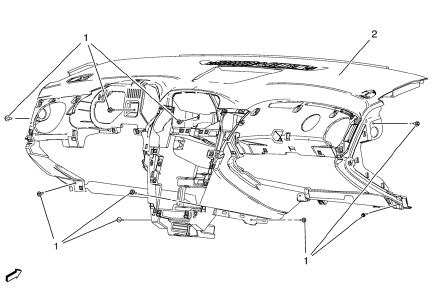
- Instrument Panel Assembly Screw (Qty: 9)
Caution: Refer to Fastener Caution in the Preface section.
Tighten 9 N·m
- Instrument Panel Assembly
Procedure
- Note location and routing of the instrument panel wiring harness prior to removal of the instrument panel assembly to ensure proper reinstallation.
- Disconnect the wiring harness from the instrument panel assembly.
- With the aid of an assistant, remove the instrument panel assembly from the vehicle.
- When replacing the instrument panel assembly, transfer all necessary components.
Test yourself
A quick Chevrolet Cruze quiz: every answer comes with an explanation and a link to the manual page.
Was this page helpful?