Exit Lighting
The headlamps, side marker lamps and taillamps light the way for the driver. The length of time the lights remain on after leaving the vehicle can be adjusted.
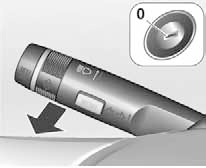
Switching On
This feature can be turned on or off, and the length of time the lights remain on can be set, in the Settings menu of the information display.
The ignition key is used to store personal settings.
Vehicles without automatic lighting control 1. Turn the ignition off.
2. Remove the key from the ignition switch.
3. Open the driver's door.
4. Pull the turn signal lever.
5. Close the driver's door.
If the driver's door is not closed, the lights turn off after two minutes.
If the turn signal lever is pulled while the driver's door is open, the lighting turns off immediately.
Vehicles with automatic lighting control 1. Set the light switch to AUTO.
2. Turn the ignition off.
3. Remove the key from the ignition switch.
Exit lighting turns on depending on the ambient light conditions.
Test yourself
A quick Chevrolet Cruze quiz: every answer comes with an explanation and a link to the manual page.