Radio with CD Player
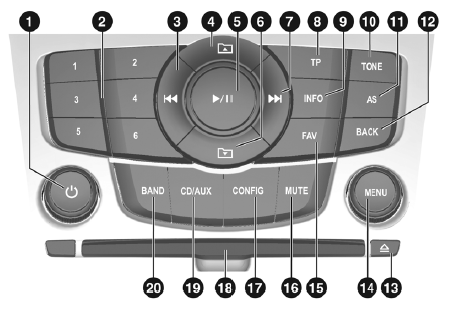
Controls
1 Knob
Press: infotainment system on/off
Turn: adjust volume
2 Preset Buttons
Radio station preset buttons
Press and hold: store a radio station
Short press:
Select a radio station
CD Changer: Selecting a CD
3 Radio: Seek Down
CD/MP3: Skip Backward
4 MP3: move up one folder level
5 CD/MP3: Play/Pause
6 MP3: move down one folder level
7 Radio: Seek Up
CD/MP3: Skip Forward
8 TP
If infotainment system is off: time and date are displayed
If infotainment system is on: change time and date settings
9 INFO
Radio: station information
CD/MP3: current track information
10 TONE
Tone Menu
11 AS
Auto Store Lists (Preset Radio Stations)
12 BACK
Menu: Back One Level
Entry: Delete Last Character
13 CD Eject
14 MENU
Turn: highlight menu options or set numeric values
Press: select/activate highlighted option; confirm setting; turn feature on/off
15 FAV
Favorites Lists (Preset Radio Stations)
16 MUTE
Mute On/Off
17 CONFIG
Open Settings Menu
18 CD Slot
19 CD/AUX
Start CD/MP3 Playback or Change Audio Source (AUX = auxiliary audio input)
20 BAND
Turn Radio On or Change Band
Test yourself
A quick Chevrolet Cruze quiz: every answer comes with an explanation and a link to the manual page.