Radio Data System
The Radio Data System (RDS) is a service for FM stations that greatly simplifies finding the desired stations with the best reception.
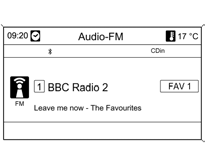
RDS stations are recognized by their program names rather than transmitter frequencies (if the RDS service is activated).
RDS Settings

To open the RDS settings menu:
Press the CONFIG button.
Select Radio settings, then select RDS options.
Turning RDS On and Off: Set RDS to On or Off.
Activating the RDS service provides the following advantages:
The program name of the selected station is shown on the display instead of its broadcast frequency.
Using the AF (Alternative Frequency) "Regionalization" function, the infotainment system always tunes to the frequency of the station with the best reception.
Depending on the station received, the infotainment system displays radio text, which may contain, for example, information about the current program.
Turning Regionalization On and Off
(RDS service must be activated for regionalization.) At certain times, some RDS stations broadcast different programs regionally on different frequencies.
Set Regional to On or Off.
Only alternative frequencies (AF) carrying the same regional program are selected.
If regionalization is turned off, alternative frequencies are selected regardless of regional programs.
Scrolling RDS Text
Some RDS stations also transmit additional information in the program name display line.
The program name is hidden during this time.
To block the display of additional information:
Set RDS-text scroll freeze to On.
Radio Text
If the RDS service and RDS station reception are activated, information about the currently received program and the music track being played at that time is displayed below the program name.
To show or hide the information:
Set Radio text to On or Off.
TA Volume
The volume of traffic announcements (TA) can be preset.
Test yourself
A quick Chevrolet Cruze quiz: every answer comes with an explanation and a link to the manual page.