In Brief
Driver Information Center (DIC)
In this manual: In Brief
~1min read
The DIC has different displays, which can be accessed by using the DIC buttons on the right side of the instrument cluster. The DIC displays trip, fuel, and warning messages if a system problem is detected.
DIC Buttons
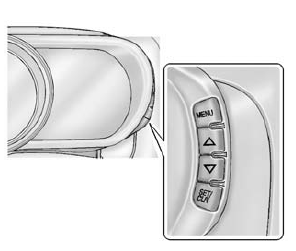
MENU: Press to display the DIC menus.
 or
 : Use to scroll through the menus.
SET/CLR: Press to set or clear the menu item displayed.
See Driver Information Center (DIC) on page 5-22.
Test yourself
A quick Chevrolet Spark quiz: every answer comes with an explanation and a link to the manual page.
Was this page helpful?