Steering Wheel Controls
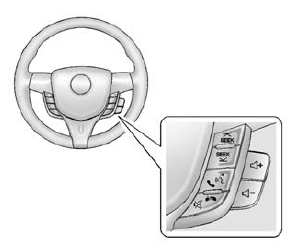
If equipped with audio steering wheel controls, some audio controls can be adjusted at the steering wheel.
 SEEK or SEEK
 : Press to go to the next or previous
radio station, song on an iPod®, or file on a USB device (if equipped).
 /

: If equipped with Bluetooth or OnStar, press to interact with those systems. See Bluetooth (Overview) on page 7-19 or Bluetooth (Infotainment Controls) on page 7-21 or OnStar Overview on page 14-1.
 /
 :
Press to silence the vehicle speakers only. Press again to turn the sound on. If equipped with OnStar or Bluetooth systems, press to decline an incoming call, to end speech recognition, or to end a current call.
 + or
 - : Press + or - to increase or decrease
the volume.
Test yourself
A quick Chevrolet Spark quiz: every answer comes with an explanation and a link to the manual page.