Infotainment System
Smartphone Link (Pandora)
In this manual: Infotainment System
24steps
~144min
4/5difficulty
Done 0 of 24
Some images and explanations may vary by phone operating systems, versions, and/or application (App) versions.
Using Pandora
- Install the Pandora application on the smartphone.
- Connect the smartphone to the infotainment system through the USB port or Bluetooth wireless technology.
- iPhone: USB connection.
- Android phone/BlackBerry phone: Bluetooth wireless technology.
- Activate the Pandora application.
- Press
 .
- Press
 smartphone link
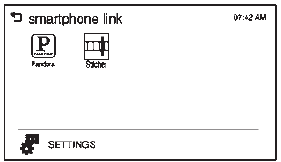 .
- Press Pandora.
If the smartphone is not connected to the infotainment system or the application is not installed on the smartphone, the Pandora menu is not activated.
Thumbs Up and Thumbs Down
Rate tracks by using  (thumbs up)
or  (thumbs down).
Pause
- Press
 to pause.
- Press
 to resume.
Changing Tracks
Press  to change to the next track.
Bookmark
To bookmark a favorite artist or track:
- Press
 on the screen.
- Press Artist or Track.
Pandora Menus
Creating Stations from Currently Playing Music
- Press MENU. The Pandora menu is displayed.
- Press create station.
- Press from currently playing.
- Press Artist or Track.
- Press the desired station. The station is added into the Pandora menu automatically.
Creating Stations by Searching by Artist or Track
- Press MENU. The Pandora menu is displayed.
- Press create station.
- Press enter artist/track. The keypad is displayed.
- Enter the artist or track name using the keypad, then press Create.
- Press the desired station. The station is added into the Pandora menu automatically.
Listening to Stations
- Press MENU. The Pandora menu is displayed.
- Press
 or
 to scroll through the list. Select
the desired station.
QuickMix
- Press MENU. The Pandora menu is displayed.
- Press QuickMix
 to listen to
a selection of tracks from your stations.
Tone Settings
- Press MENU. The Pandora menu is displayed.
- Press tone settings. The tone settings menu is displayed. See “Tone Settings” under “Radio Controls with Touchscreen” in Operation on page 7-6.
Test yourself
A quick Chevrolet Spark quiz: every answer comes with an explanation and a link to the manual page.
Was this page helpful?