Infotainment System
Using the Preset Buttons
In this manual: Infotainment System
2steps
~12min
1/5difficulty
Done 0 of 2
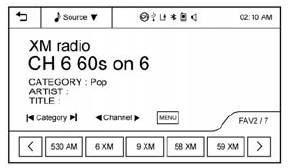
Up to seven favorites pages can be saved, and each page can store up to five channels.
To change a preset button, tune to the new desired channel and hold the button.
Listening to Preset Channels
- Continue pressing
 or
 to select the desired favorites
page. - Press the preset button to listen to the channel saved to that button.
Test yourself
A quick Chevrolet Spark quiz: every answer comes with an explanation and a link to the manual page.
Was this page helpful?