Infotainment System
Using the SiriusXM Menu
In this manual: Infotainment System
13steps
~78min
3/5difficulty
Done 0 of 13
Operation
- Press MENU on the XM radio screen.
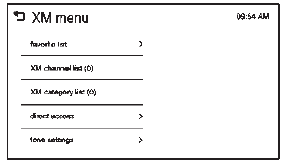
- Press the menu to select the desired item or to display the detail menu item.
- Press
 to return to the previous
menu.
Favorite List
- Press favorite list from the XM menu. The favorite list information is displayed.
- Press
 or
 to find the desired station. Tune
to the station by selecting it.
Channel List
- Press XM channel list from the XM menu. The channel list is displayed
- Press
 or
 to find the desired channel. Tune
to the channel by selecting it.
Category List
- Press XM category list from the XM menu. The category list is displayed.
- Press
 or
to find the desired category. Tune
to the category by selecting it.
Direct Access
- Press direct access from the XM menu. The direct access screen is displayed.
- Press the channel number to tune to the desired channel.
- Press OK.
Tone Settings
From the tone settings menu, the sound features can be set up for SiriusXM audio and each audio player’s functions.
- Press tone settings from the XM menu. The tone settings screen is displayed. See “Tone Settings” under Operation on page 7-6.
- Press OK.
Test yourself
A quick Chevrolet Spark quiz: every answer comes with an explanation and a link to the manual page.
Was this page helpful?