Main menu
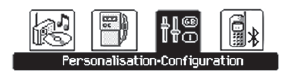
- Press the "MENU" button to enter the main menu:
- audio functions,
- on-board computer,
- personalisation - configuration,
- telephone (hands-free kit).
- Press the "5" or "6" buttons to scroll through the individual menus, then press the "OK" button to select the required menu.
 "Audio functions" menu
(Audio functions)
When the radio is on, selecting this menu lets you turn on or off the radio functions (RDS, REG, RadioText), CD player functions (introscan, random playback, CD repeat) or MP3 player functions (USB / Jack connectors).
For detailed information on the "Audio functions" application, refer to the "Radio" section.
 "Trip computer
" menu
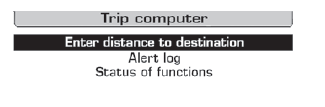
Selecting this menu lets you check vehicle status information (alarm log, function status...).
Alarm log
Provides a list of warning messages, displayed one after another on the multifunction screen.
Function status
Displays the status (active - inactive) of the functions fitted to the vehicle.
Entering the distance to destination
Allows you to enter an approximate distance to the final destination.
- Press the "MENU" button to open the main menu.
- Press the arrows, then the "OK" button, to select the "On-board computer" menu.
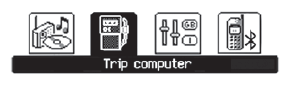
- In the "On-board computer" menu, select one of the following applications:
 Menu
"Personalisation-Configuration" (Personalisation - Configuration)
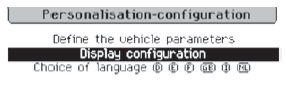
When this menu is selected, you have access to the following information:
- vehicle parameter settings,
- display configuration,
- language selection.
Vehicle parameter settings
When this menu is selected, the following equipment can be switched on or off:
- wiper linked to reverse gear (see the "Visibility" section),
- follow-me-home lighting and its duration (see the "Visibility" section).
- parking assistance (see the "Driving" section).
- automatic emergency braking (see the "Active City Brake" section).
From this menu you can also reinitialise the low tyre pressure detection system (see the "Safety" section).
Example: adjusting the follow-me-home lighting duration
- Press the "5" or "6" buttons, then the "OK" button, to select the menu.
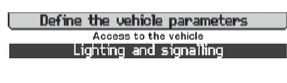
- Press the "5" or "6" buttons, then the "OK" button, to select the "Follow-me-home lighting" line.
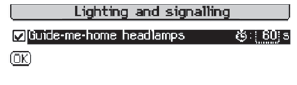
- Press the "7" or "8" buttons to set the required value (15, 30 or 60 seconds), then press the "OK" button to confirm.
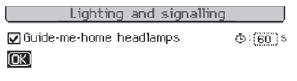
- Press the "5" or "6" buttons, then the "OK" button, to select "OK" and confirm, or select the "Back" button to cancel.
Display configuration
When this menu is selected, the following settings can be made:
- video brightness adjustment,
- date and time setting,
- unit selection.
Setting the date and time
- Select the "Date and time adjustment" function using the "5" or "6" buttons.
- Press "OK" to confirm the selection.
- Set the parameters one by one using the "7" or "8" buttons, then confirm with the "OK" button.
- Then select the "OK" field on the screen and confirm.
Language selection
In this menu, the display language can be changed by selecting it from the list.
For safety reasons, always configure the multifunction screens only when the vehicle is stationary. "Phone" menu
If the radio is switched on, selecting this menu allows you to configure the Bluetooth hands-free kit (pairing), view the individual phone books (call log, services...) and manage calls (answer, end, redial, private mode...).
For detailed information on the "Phone" application, refer to the "Radio" section.
Test yourself
A quick Citroen DS3 quiz: every answer comes with an explanation and a link to the manual page.