Driving checks
Controls
In this manual: Driving checks
~1min read
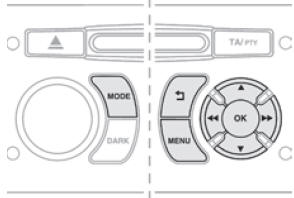
Using the radio panel, you can:
- press the "MENU" button to enter the main menu,
- press the "5" or "6" buttons to scroll through the items on the screen,
- press the "MODE" button to change the current application (trip computer, audio source...),
- press the "7" or "8" buttons to change settings,
- press the "OK" button to confirm, or
- press the "Back" button to cancel the current operation.
Test yourself
A quick Citroen DS3 quiz: every answer comes with an explanation and a link to the manual page.
Was this page helpful?