Introduction
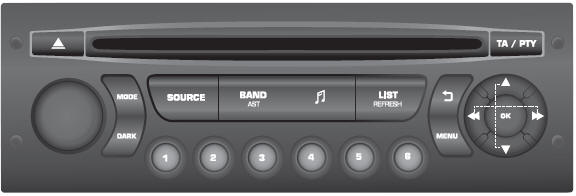
 On / Off,
volume adjustment.
 Selecting the audio source:
radio; USB; AUX; CD; Streaming.
 Setting audio options:
front/rear balance; left/right balance; bass/treble; loudness; sound correction.
 Displaying the list of
local stations.
Long press: tracks on the CD or in the MP3 folder (CD / USB).
 Selecting the screen display
between modes: date; audio functions; on-board computer; telephone.
 The DARK button changes
the screen display for better comfort when driving at night.
First press: only the top bar is lit.
Second press: black screen.
Third press: return to the standard display.
 Cancelling the current operation.
 Displaying the main menu.
 Buttons 1 to 6.
Selecting a stored radio station.
Long press: storing a station in memory.
 Automatic frequency search
down/up the scale.
Selecting the previous/next track on a CD, MP3 or USB.
 Selecting a lower/higher frequency.
Selecting the previous/next MP3 folder.
Selecting the previous/next folder / genre / artist / playlist (USB).
 Confirm.
 Switching TA
(Traffic Announcements) on/off.
Long press: access PTY* (Programme TYpe) mode.
 Ejecting the CD.
 Selecting the wave bands
AM / FM.
Test yourself
A quick Citroen DS3 quiz: every answer comes with an explanation and a link to the manual page.