Body
Compass Zone Adjustment
In this manual: Body
4steps
~24min
2/5difficulty
Done 0 of 4
Compass Calibration Zone Map 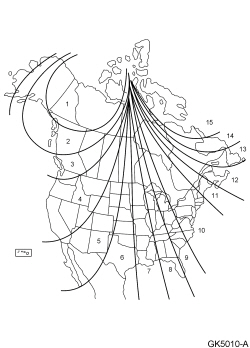
- Refer to the compass calibration zone map to select the correct compass zone setting for the geographic location of the vehicle.
- With the key in the ON position, press and hold the Front Controls Interface Module (FCIM) preset buttons 7 and 9 for approximately 5 seconds until the compass display shows the current zone setting (ZONE XX). Release the 7 and 9 buttons.
- NOTE: Approximately 5 seconds after the buttons have been released, the compass display exits the zone setting mode.
Before the zone setting mode turns off, momentarily press and release the FCIM preset buttons 7 and 9 to increase the zone increment by one. Set the zone display number to match the vehicle geographical location that is shown on the compass calibration zone map.
- To exit the zone setting mode, release all FCIM buttons for 5 seconds.
Test yourself
A quick Ford Focus quiz: every answer comes with an explanation and a link to the manual page.
Was this page helpful?