Body
Instrument Cluster (IC) - Removal and Installation
In this manual: Body
10steps
~60min
3/5difficulty
Done 0 of 10
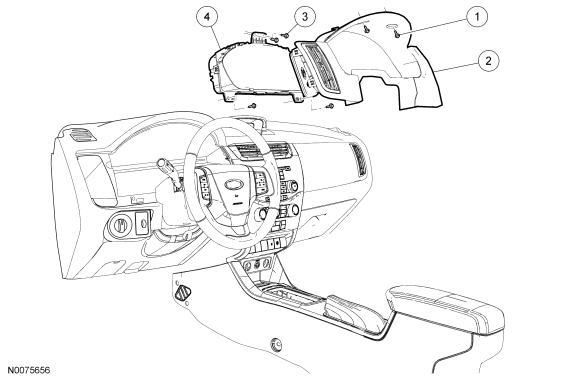
| Item | Part Number | Description |
|---|---|---|
| 1 | W707628 | Instrument Cluster (IC) finish panel screws (2 required) |
| 2 | 54044D70 | IC finish panel |
| 3 | W705314 | IC screws (4 required) |
| 4 | 10849 | IC |
Removal NOTE:
If installing a new Instrument Cluster (IC) , all vehicle keys are erased during the parameter reset procedure. Verify at least 2 of the vehicle keys are available prior to carrying out this procedure.
- If installing a new IC , upload the IC configuration information to the scan tool. For additional information, refer to Programmable Module Installation (PMI) in Section 418-01.
- Lower the steering column to the lowest position.
- NOTE: Pull the IC finish panel out to release the fasteners.
Remove the 2 screws and the IC finish panel.
- Remove the 4 screws and the IC .
- Disconnect the electrical connector.
- Position the IC in the instrument panel.
- Connect the electrical connector.
- Install the 4 IC screws.
- Install the IC finish panel and the 2 screws.
- If installing a new IC , download the IC configuration information from the scan tool into the new IC . For additional information, refer to PMI in Section 418-01.
- NOTE: If a new IC is installed, the IC and the PCM require a parameter reset to allow the IC and the PCM to recognize each other. Failure to carry out the parameter reset to the IC and the PCM may result in a no start condition.
If installing a new IC , carry out the parameter reset procedure. For additional information, refer to Section 419-01B.
- If installing a new IC , carry out the key programming procedure. For additional information, refer to Section 419-01B.
Test yourself
A quick Ford Focus quiz: every answer comes with an explanation and a link to the manual page.
Was this page helpful?