General Procedures, Removal and Installation
GENERAL PROCEDURES
Belt-Minder Deactivating/Activating
NOTE: If you are using MyKey, the Belt-Minder cannot be disabled. If the Belt-Minder has been previously disabled, it is re-enabled during the use of MyKey.
- Apply the parking brake before deactivating/activating the Belt-Minder.
- Place the gear selector lever in PARK (P).
- Place the ignition in OFF.
- Unbuckle the driver and passenger safety belts.
- Place the ignition in the ON state (do not start the engine).
- Wait until the safety belt warning indicator turns off (approximately 1 minute).
- NOTE: Step 7 and 8 must be completed within 30 seconds after safety belt warning indictor turns off or the procedure must be repeated.
For the seating position to be disabled/enabled, buckle then unbuckle the safety belt 3 times, ending with the safety belt unbuckled. After this step, the safety belt warning indicator illuminates for 3 seconds and turns off.
- When the safety belt warning indicator turns off, buckle then unbuckle the safety belt.
- This disables the Belt-Minder feature for that seating position, if it is currently enabled. As confirmation, the safety belt warning indicator flashes 4 times per second for 3 seconds.
- This enables the safety Belt-Minder feature for that seating position, if it is currently disabled. As confirmation, the safety belt warning indicator flashes 4 times per second for 3 seconds, followed by 3 seconds with the safety belt warning indicator off, then the safety belt warning indicator flashes 4 times per second for 3 seconds again.
- After confirmation, the deactivation/activation procedure is complete.
REMOVAL AND INSTALLATION
Instrument Panel Cluster (IPC)
NOTE: Steering column shown removed for clarity.
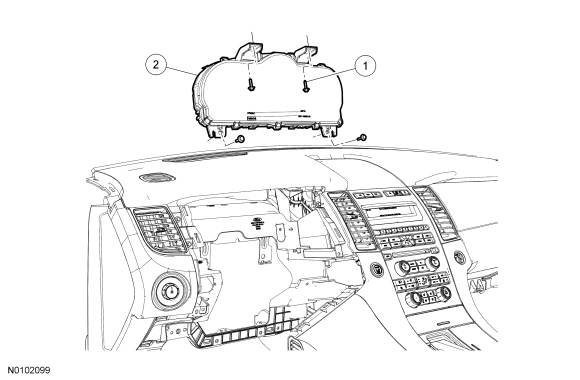

Removal
NOTE: It is critical that the correct Instrument Panel Cluster (IPC) be installed when installing a new IPC. The IPC differs between Passive Anti-Theft System (PATS) vehicles equipped with Intelligent Access (IA) and vehicles not equipped with IA. If the incorrect IPC is installed, the vehicle may exhibit a PATS no-start condition.
NOTE: If installing a new IPC, all vehicle keys are erased during the parameter reset procedure. Verify at least 2 of the vehicle keys are available prior to carrying out this procedure.
- If installing a new IPC, upload the module configuration information to the scan tool. For additional information, refer to Section 418-01.
- Remove the IPC finish panel. For additional information, refer to Section 501-12.
- Remove the 4 screws and the IPC.
- Disconnect the electrical connector.
Installation
- Position the IPC in the instrument panel, connect the electrical connector and install the 4 screws.
- Install the IPC finish panel. For additional information, refer to Section 501-12.
- If installing a new IPC, download the IPC configuration information from the scan tool into the new IPC. For additional information, refer to Programmable Module Installation (PMI) in Section 418-01.
- NOTE: If installing a new IPC on vehicles that are not equipped with IA, the IPC and the PCM require a parameter reset to allow the IPC and the PCM to recognize each other. Failure to carry out the parameter reset to the IPC and the PCM may result in a no start condition.
If installing a new IPC on vehicles that are not equipped with IA, carry out the parameter reset procedure. For additional information, Refer to the appropriate section in Group 419 for the procedure..
- NOTE: If equipped, the vehicle's Integrated Keyhead Transmitter (IKT) keys must be programmed to the new IPC.
If installing a new IPC, carry out the PATS key programming. For additional information, Refer to the appropriate section in Group 419 for the procedure..
Instrument Panel Cluster (IPC) Lens


Removal and Installation
- Remove the IPC. For additional information, refer to Instrument Panel Cluster (IPC) in this section.
- Release the 6 retaining tabs and remove the IPC lens.
- To install, reverse the removal procedure.
Test yourself
A quick Ford Taurus quiz: every answer comes with an explanation and a link to the manual page.