Hands-Free
The liftgate can be operated with a kick motion under the rear bumper between the left exhaust pipe and the license plate.
The RKE transmitter must be within 1 m (3 ft) of the rear bumper to operate the power liftgate hands-free.
The hands-free function will not operate while the liftgate is moving. To stop the liftgate while moving, use one of the liftgate buttons.
The hands-free function can be personalized. See Vehicle Personalization. Select from the following:
Open and Close: A kick motion activates both opening and closing of the liftgate.
Open Only: A kick motion activates only the opening of the liftgate.
Off: The feature is disabled.
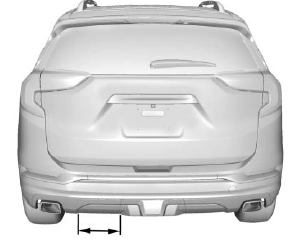
Kick Zone Length
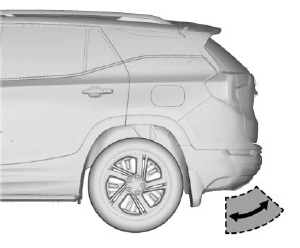
Kick Motion
Attempting to move the liftgate too quickly or with excessive force may damage the vehicle.
To operate, move your foot up in a quick motion under the rear bumper between the left exhaust pipe and the license plate, then pull it back.
- Do not sweep your foot from side to side.
- Do not hold your foot under the bumper; the liftgate will not activate.
- Do not touch the power liftgate until it has stopped moving.
- This feature may be temporarily disabled under certain conditions. If the power liftgate does not respond to a kick, open or close the liftgate by another method or start the vehicle. The feature will be re-enabled.
When closing the liftgate using this feature, there will be a short delay. The tail lamps will flash and a chime will sound. Move away from the liftgate before it begins to move.
Test yourself
A quick GMC Terrain quiz: every answer comes with an explanation and a link to the manual page.