To Set the Vehicle Speed
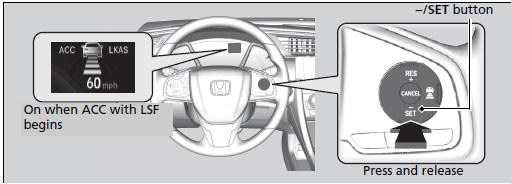
When driving at 40 km/h or above: Take your foot off the pedal and press the -/SET button when you reach the desired speed. The moment you release the button, the set speed is fixed, and ACC with LSF begins.
When driving slower than 40 km/h: If the vehicle is moving and the brake pedal is not depressed, pressing the button fixes the set speed to 40 km/h regardless of current vehicle speed. If your vehicle is stationary and a vehicle is detected ahead, your vehicle speed can be set, even with the brake pedal depressed.
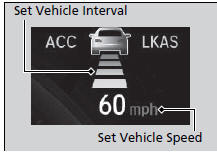
When ACC with LSF starts operating, the vehicle icon, interval bars and set speed appear on the driver information interface.
To Set the Vehicle Speed
You can switch the displayed set speed measurements on the driver information interface*/ audio/information screen* between mph and km/h.
Test yourself
A quick Honda Civic quiz: every answer comes with an explanation and a link to the manual page.