Tire Pressure Monitoring System (TPMS)
U.S. models
Instead of directly measuring the pressure in each tire, the TPMS on this vehicle monitors and compares the rolling radius and rotational characteristics of each wheel and tire while you are driving to determine if one or more tires are significantly under-inflated. This will cause the low tire pressure/TPMS indicator to come on and a message to appear on the driver information interface*.
Tire Pressure Monitoring System (TPMS)
The system does not monitor the tires when driving at low speed. Conditions such as low ambient temperature and altitude change directly affect tire pressure and can trigger the low tire pressure/TPMS indicator to come on.Tire pressure checked and inflated in:
- Warm weather can become under-inflated in colder weather.
- Cold weather can become over-inflated in warmer weather.
The TPMS may not function properly if tire type and size are mixed. Make sure to use the same size and type of tire.
The low tire pressure/TPMS indicator may come on with a delay or may not come on at all when:
- You rapidly accelerate, decelerate, or turn the steering wheel.
- You drive on snowy or slippery roads.
- Snow chains are used.
The low tire pressure/TPMS indicator may come on under the following conditions:
- A compact spare tire is used.
- There is a heavier and uneven load on the tires, such as when towing a trailer, than the condition at calibration.
- Snow chains are used.
TPMS Calibration
You must start TPMS calibration every time you:
- Adjust the pressure in one or more tires.
- Rotate the tires.
- Replace one or more tires.
Before calibrating the TPMS:
- Set the cold tire pressure in all four tires.
Make sure:
- The vehicle is at a complete stop.
Manual transmission models
- The shift lever is in N.
Continuously variable transmission models
- The shift lever is in P.
All models
The ignition switch is in ON  *1.
*1: Models with the smart entry system have an ENGINE START/STOP button instead of an ignition switch.
Models with information display
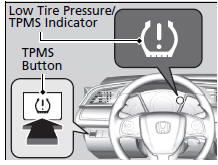
Press and hold the TPMS button until the low tire pressure/TPMS indicator blinks twice, indicating the calibration process has begun.
- If the low tire pressure/TPMS indicator does not blink, confirm the above conditions then press and hold the TPMS button again.
- The calibration process finishes automatically.
Models with color audio system Models with driver information interface

You can calibrate the system from the customized features on the driver information interface.
- Press the
 then
 /
 button to select
 (Vehicle Settings), then press the ENTER button.
► TPMS Calibration appears on the display.
- Press the ENTER button.
► The display switches to the customization setup screen, where you can select Cancel or Calibrate.
- Press the
 /
 button and select Calibrate, then press the ENTER button.
► Calibration Started screen appears, then the display returns to the customization menu screen.
- If the Calibration Failed to Start message appears, repeat steps 2-3.
- The calibration process finishes automatically.
TPMS Calibration
- TPMS cannot be calibrated if a compact spare tire is installed.
- The calibration process requires approximately 30 minutes of cumulative driving at speeds between 30-65 mph (48-105 km/h).
- During calibration, if the ignition is turned off then on again, and the vehicle is not moved within 45 seconds, the low tire pressure indicator may come on briefly. This is normal and indicates that the calibration process is not yet complete.
The low tire pressure/TPMS indicator may come on after re-connecting the battery. Drive a short distance at more than 20 km/h. The indicator should go off. If it does not, have your vehicle checked by a dealer.
Models with Display Audio

You can calibrate the system from the customized feature on the audio/information screen.
- Select
 .
- Select Settings.
- Select Vehicle.
- Select TPMS Calibration.
- Select Cancel or Calibrate.
► When the calibration is complete, the display returns to the customization menu screen.
- If the Calibration Failed To Start.
message appears, repeat steps 3-5.
- The calibration process finishes automatically.
Test yourself
A quick Honda Civic quiz: every answer comes with an explanation and a link to the manual page.