Using the Smart Entry with Push Button Start System
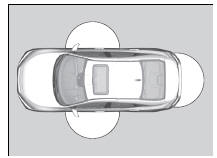
When you carry the smart entry remote, you can lock/unlock the doors, fuel fill door, and open the trunk.
You can lock/unlock the doors and fuel fill door within a radius of about 32 inches (80 cm) of the outside door handle. You can open the trunk within about 32 inches (80 cm) radius from the trunk release button.
Locking the vehicle
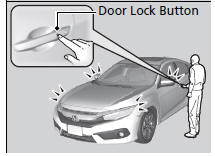
Press the door lock button on the front door.
- Some exterior lights flash; the beeper sounds; all the doors and trunk lock; and the security system sets.
Locking/Unlocking the Doors from the Outside
If the interior light switch is in the door activated position, the interior lights come on when you unlock the doors.
No doors opened: The lights fade out after 30 seconds.
Doors relocked: The lights go off immediately.
Interior Lights
Using the Smart Entry with Push Button Start System*
- Do not leave the smart entry remote in the vehicle when you get out. Carry it with you.
- Even if you are not carrying the smart entry remote, you can lock/unlock the doors while someone else with the remote is within range.
- The door may be unlocked if the door handle is covered with water in heavy rain or in a car wash if the smart entry remote is within range.
- If you grip a front door handle wearing gloves, the door sensor may be slow to respond or may not respond by unlocking the doors.
- After locking the door, you have up to 2 seconds during which you can pull the door handle to confirm whether the door is locked. If you need to unlock the door immediately after locking it, wait at least 2 seconds before gripping the handle, otherwise the door will not unlock.
- The door might not open if you pull it immediately after gripping the door handle. Grip the handle again and confirm that the door is unlocked before pulling the handle.
- Even within the 32 inches (80 cm) radius, you may not be able to lock/unlock the doors with the smart entry remote if it is above or below the outside handle.
- The smart entry remote may not operate if it is too close to the door and door glass.
The light flash, beep, and door unlock mode settings can be customized.
Customized Features
Locking the vehicle (Walk away auto lock)
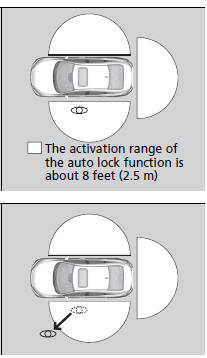
When you walk away from the vehicle while carrying the smart entry remote, the doors will automatically lock.
The auto lock function activates when all doors are closed, and the smart entry remote is within about 8 feet (2.5 m) radius of the outside door handle.
1. Exit vehicle while carrying smart entry remote and close door(s).
2. While within about 8 feet (2.5 m) radius of the vehicle
- The beeper sounds; the auto lock function will be activated.
3. Carry the smart entry remote beyond about 5 feet (1.5 m) from the vehicle and remain outside this range for 2 or more seconds.
- Some exterior lights flash; the beeper sounds; all doors will then lock.
Locking the vehicle (Walk away auto lock)
The auto lock function is set to OFF as the factory default setting. The auto lock function can be set to ON using the audio/information screen.
Customized Features
After the auto lock function has been activated, when you stay within the locking/unlocking operation range, the indicator on the smart entry remote will continue to flash until the doors are locked.
When you stay beside the vehicle within the operation range, the doors will automatically lock approximately 30 seconds after the auto lock function activating beeper sounds.
When you open a door after the auto lock function activating beeper sounds, the auto lock function will be canceled.
When all doors have been closed and the smart entry remote is inside the vehicle, or if the smart entry remote is not detected within about 8 feet (2.5 m) of the vehicle, auto lock function will not be activated.
To temporarily deactivate the function:
1. Set the power mode to OFF.
2. Open the driver’s door.
3. Using the master door lock switch, operate the lock as follows:
Lock Unlock
 Lock
 Unlock.
- The beeper sounds and the function is deactivated.
To restore the function:
- Set the power mode to ON.
- Lock the vehicle without using the auto lock function
- Walk away at least more than about 8 feet (2.5 m) away from the vehicle while carrying the smart entry remote.
Locking the vehicle (Walk away auto lock)
The auto lock function does not operate when any of the following conditions are met.
- The smart entry remote is inside the vehicle.
- A door or the hood is not closed.
- The power mode is set to any mode other than OFF.
- The smart entry remote is not located within a radius of about 8 feet (2.5 m) from the vehicle when you get out of the vehicle and close the doors.
Auto lock function operation stop beeper
After the auto lock function has been activated, the auto lock operation stop beeper sounds for approximately two seconds in the following cases.
- The smart entry remote is put inside the vehicle through a window
- You are located too close to the vehicle.
- The smart entry remote is put inside the trunk.
Unlocking the vehicle
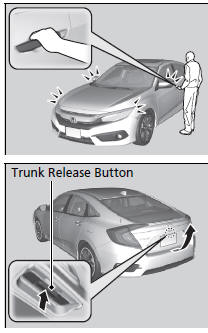
Grab the driver’s door handle:
- The driver’s door and fuel fill door unlocks.
- Some exterior lights flash twice and the beeper sounds twice
Grab the front passenger’s door handle:
- All the doors unlock.
- Some exterior lights flash twice and the beeper sounds twice.
Press the trunk release button:
- The trunk unlocks and opens.
- Some exterior lights flash and the beeper sounds.
Using the Trunk Opener
Using the Smart Entry with Push Button Start System*
If you do not open a door within 30 seconds of unlocking the vehicle with the smart entry system, the doors will automatically relock.
You can lock or unlock doors using the smart entry system only when the power mode is in VEHICLE OFF.
Test yourself
A quick Honda Civic quiz: every answer comes with an explanation and a link to the manual page.