Driving
When the System can be Used
In this manual: Driving
2steps
~12min
1/5difficulty
Done 0 of 2
The system can be used when the following conditions are met.
- The lane in which you are driving has detectable lane markers on both sides, and your vehicle is in the center of the lane.
- The vehicle speed is between 45 and 145 km/h.
- You are driving on a straight or slightly curved road.
- The turn signals are off.
- The brake pedal is not depressed.
- The wipers are not in continuous operation.
How to activate the system
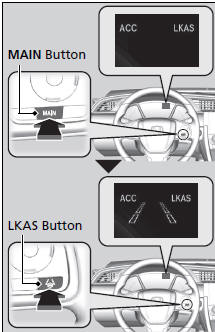
- Press the MAIN button. ► The LKAS is on in the driver information interface.
The system is ready to use.
- Press the LKAS button. ► Lane outlines appear on the driver information interface.
The system is activated.
When the System can be Used
If the vehicle drifts toward either the left or right lane line due to the system applying torque, turn off the LKAS and have your vehicle checked by a dealer.
The LKAS temporarily deactivates when it fails to detect lane lines. When the system detects the lines again, it comes back on automatically.
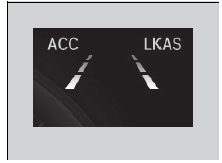
- Keep your vehicle near the center of the lane while driving.
► The dotted outer lines change to solid ones once the system starts operating after detecting the left and right lane markings.
Test yourself
A quick Honda Civic quiz: every answer comes with an explanation and a link to the manual page.
Was this page helpful?