Second generation (2007-2026)
Display and Volume Settings
In this manual: Second generation (2007-2026)
~1min read
 INFO button
► Setup
Use the Main Setup screen to adjust the display and volume.
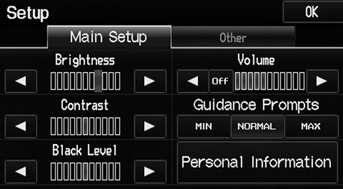
Select  or
 to adjust the desired
item.
: Adjusts the navigation system volume level.
You can set separate daytime and nighttime settings for Brightness, Contrast, and Black Level. Adjust each setting when the display is in either daytime or nighttime mode.
You can set the display and volume settings using voice commands.
VolumeIf you set Volume to Off, you will not hear route guidance or voice command confirmations. If you then select VOICE on the map menu, you will hear route guidance at the default volume.
Test yourself
A quick Honda Fit quiz: every answer comes with an explanation and a link to the manual page.
Was this page helpful?