Second generation (2007-2026)
Edit Waypoint Search Area
In this manual: Second generation (2007-2026)
~1min read
 INFO button
► Setup ►Other ►Routing & Guidance►Edit Waypoint Search Area “Edit”
Select the distance from your highlighted route line (on either side of your route) that the system will search for a waypoint.
You can specify a different search distance for freeways and surface streets.
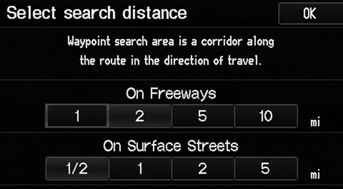
1. Select a search distance.
2. Select OK.
The following options are available:
• On Freeways: 1, 2, 5, or 10 miles can be set. Factory default is 2 miles.• On Surface Street: 1/2, 1, 2, or 5 miles can be set. Factory default is 1/2 mile.
The search distance does not affect the search range used for the Find Nearest voice commands (e.g., say  “Find nearest gas
station”).
Test yourself
A quick Honda Fit quiz: every answer comes with an explanation and a link to the manual page.
Was this page helpful?