Second generation (2007-2026)
Off-road Tracking
In this manual: Second generation (2007-2026)
~1min read
 INFO button
► Setup ►Other ►Vehicle
The navigation system can be set to display white off-road tracking dots (“breadcrumbs”) on the map screen whenever you drive into an area approximately 1/2 mile away from a mapped road.
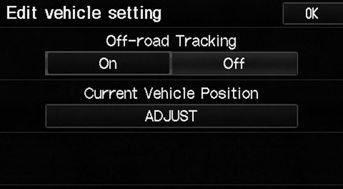
Select an option.
The following options are available:
• On: The system displays the white tracking dots.• Off (factory default): Disables the feature.
To clear existing breadcrumbs, set Off-road Tracking to Off, exit the Setup screen, and then set Off-road Tracking to On again.
Test yourself
A quick Honda Fit quiz: every answer comes with an explanation and a link to the manual page.
Was this page helpful?