Second generation (2007-2026)
Displaying the Map Menu
In this manual: Second generation (2007-2026)
~1min read
Use the Map Menu to control the icons displayed on the screen. You can also use the Map Menu to find locations or to cancel the route.
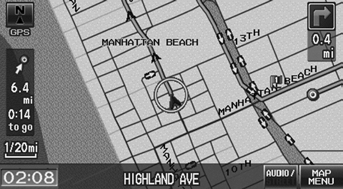
1. On the map screen, select MAP MENU (if displayed).
► The Map Menu is displayed on the map screen.
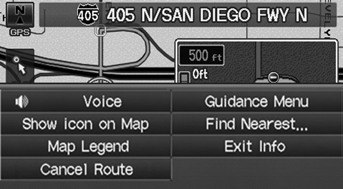
2. Select an item.
The following items are available:
• Cancel Route: Cancels your current route. • Show icon on Map: Selects the icons to display on the map.• Map Legend: Displays an overview of the map features.
If you scroll the map while en route, press the MAP/GUIDE (or CANCEL/BACK) button to return to the current position map screen, then select MAP MENU.
• Guidance Menu: Allows you to set or confirm the guidance points and freeway exits for your route. • Find Nearest…: Allows you to find the nearest place/landmark (e.g., nearest gas station) by specifying a category. You can then add the location to the list of destinations, set as a waypoint, or set as your destination.• Exit Info: Displays a list of the freeway exits.
Test yourself
A quick Honda Fit quiz: every answer comes with an explanation and a link to the manual page.
Was this page helpful?