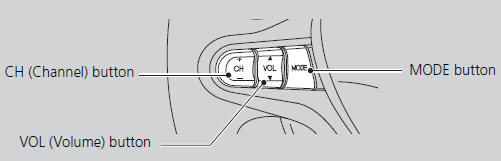
Control basic audio system functions using the controls mounted on the steering wheel.
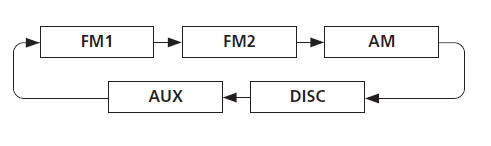
■MODE Button
Cycles through the audio modes as follows:
DISC mode appears only when a disc is loaded.
When in AUX mode, the following are operable from the remote audio controls:
• iPod®/USB flash drive connected to the USB adapter cable • Bluetooth® Audio (not all phones support this function)
■VOL (Volume) Button Adjusts the volume. • Press the (Volume) button to increase the volume.
• Press the (Volume) button to decrease the volume.
■CH (Channel) Button FM/AM • Press the (Channel) button to select the next preset station (channel). • Press the (Channel) button to select the previous preset station (channel).
• Press and hold the or button to skip to the next or previous station (channel) in the frequency.
DISC, iPod®, USB, or Bluetooth® Audio • Press the button to skip to the next track. • Press the button to skip to the beginning of the current track. Press the button again to go to the beginning of the previous track.
• Press and hold the or button to skip up or down a folder (DISC/USB).
?
Test yourself
A quick Honda Fit quiz: every answer comes with an explanation and a link to the manual page.
 (Volume) button to
 (Channel) button to
 (Channel) button to
 button to skip to the
 (Volume) button to
 or