Second generation (2007-2026)
Adjusting the Sound
In this manual: Second generation (2007-2026)
~1min read
 AUDIO button (
►AUDIO MENU ) ► SOUND
Adjust the sound bass, treble, fader, and balance. In addition, you can set Speedsensitive Volume Compensation (SVC).
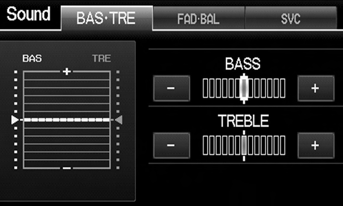
1. Select the tab to adjust the desired sound mode.
2. Adjust the desired level.
Fader adjusts the front-to-back strength, while balance adjusts the side-to-side strength.
The SVC has four modes: Off, Low, Mid, and High. SVC adjusts the volume level based on the vehicle speed. The faster you go, the audio volume increases. As you slow down, the audio volume decreases. If you feel the sound is too loud, choose Low, and vice versa.
Test yourself
A quick Honda Fit quiz: every answer comes with an explanation and a link to the manual page.
Was this page helpful?