Controls
Turn Signals
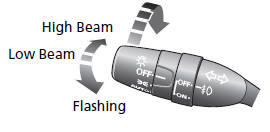
Turn Signal Control Lever

Lights
Light Control Switches
Wipers and Washers
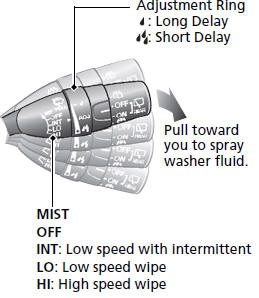
Wiper/Washer Control Lever
Steering Wheel
● To adjust, push the adjustment lever down, adjust to the desired position, then pull up the lever back in place.

Power Sliding Door
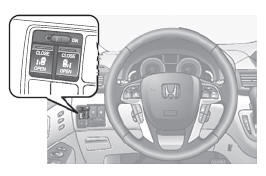
● When the main switch is ON, the power sliding door opens and closes automatically when you press OPEN or CLOSE side of the /
 switch.
Tailgate

● To open the tailgate, push the tailgate release button, and lift up.
Models with the power tailgate
● Press the power tailgate button on the driver’s door or the remote transmitter to open and close the power tailgate.
Power Door Mirrors
● With the ignition switch in ON  , move the selector switch to L or R.
● Push the appropriate edge of the adjustment switch to adjust the mirror.

● Place the selector switch in the L or R position to use the reverse tilt door mirror feature.
Power Windows
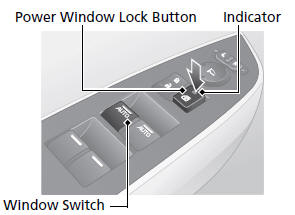
● With the ignition switch in ON , open and close the power windows.
● If the power window lock button is in the OFF position, the passenger's window can be opened and closed with its own switch.
● If the power window lock button is in the ON position (indicator is on), the passenger's window switch is disabled.
Heating and Cooling System
● Rotate the fan control dial to adjust the fan speed.
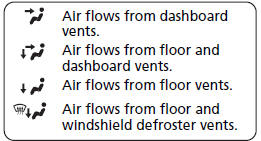
● Press the Mode button to select the vents air flows from.
● Rotate the temperature control dial to adjust the temperature.
● Use the  button for maximum cool setting.
● Press the  button to turn the system on or off.
● Press the  button to defrost the windshield.

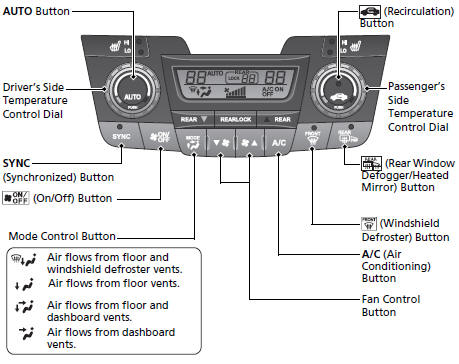
Climate Control System
● Press the AUTO button to activate the climate control system.
● Press the button to turn the system on or off.
● Press the button to defrost the windshield.
Models with navigation system
The climate control system is voice operable. See the navigation system manual for complete details.
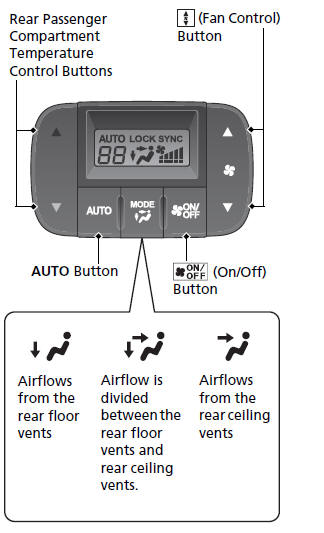
Rear Climate Control
● Press the AUTO button to activate the rear climate control system.
● Press the button to turn the system on or off.
Clock
1 Press the CLOCK button to access the clock adjustment mode screen.
2 Press  to select the item you want to adjust (12/24 hour mode, hour, minutes).
3 Rotate  to make the adjustment.
4 Press  to enter your selection. Repeat steps 2 to 4 to adjust other items.
5 To enter the selection, press  and select EXIT, then press
 .
Models with navigation system
The navigation system receives signals from GPS satellites, updating the clock automatically.