How to Select a Play Mode
You can select repeat, random, and scan modes when playing a track or file.
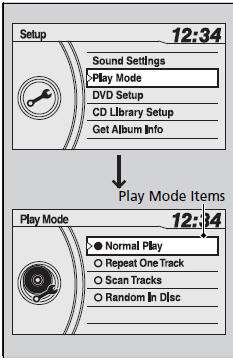
1. Press the SETUP button.
2. Rotate  to select Play Mode, then press
 .
3. Rotate to select a mode, then press .
■ To turn off a play mode
1. Press the SETUP button.
2. Rotate to select Play Mode, then press .
3. Rotate to select Normal Play, then press .
Press the  button to go back to the previous display, and press the SETUP button to cancel this setting mode.
Play Mode Menu Items
Normal Play
Repeat One Track: Repeats the current track/file(s).
Repeat One Folder (MP3/WMA/AAC): Repeats all files in the current folder.
Random in Folder (MP3/WMA/AAC): Plays all files in the current folder in random order.
Random in Disc: Plays all tracks/files in random order.
Scan Tracks: Samples all tracks on the CD.
(MP3/WMA/AAC): Samples all files in the current folder.
Scan Folders (MP3/WMA/AAC): Samples the first file in each folder.