Information Display
The information display shows the odometer, trip meter, engine oil life and maintenance service item codes, and other gauges.
■Switching the Display
Press the  (Select/Reset) knob to change the display.
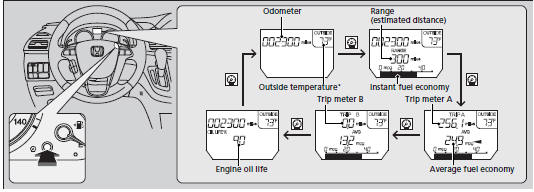
■Odometer
Shows the total number of miles or kilometers that your vehicle has accumulated.
■Trip Meter
Shows the total number of miles or kilometers driven since the last reset. Meters A and B can be used to measure 2 separate trips.
■ Resetting a trip meter To reset a trip meter, display it, then press and hold the knob. The trip meter is reset to 0.0.
Switch between trip meter A and trip meter B by pressing the knob.
■Instant Fuel Economy
Shows the instant fuel economy as a bar graph in mpg or l/100 km.
■Average Fuel Economy
Shows the estimated average fuel economy of each trip meter in mpg or l/100 km.
The display is updated at set intervals. When a trip meter is reset, the average fuel economy is also reset.
■Engine Oil Life
Shows the remaining oil life and Maintenance MinderTM.
■Range
Shows the estimated distance you can travel on the remaining fuel. This distance is estimated from the fuel economy of your trips in the past.
■Outside Temperature*
Shows the outside temperature in Fahrenheit (U.S.) or Celsius (Canada).
■ Adjusting the outside temperature indicator Adjust the temperature reading up to ±5ºF or ±3ºC if the temperature reading seems incorrect.
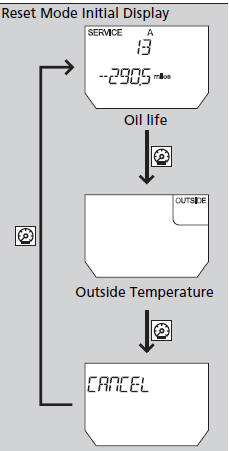
1. Turn the ignition switch to ON  .
2. Press and hold the  (Select/Reset) knob for 10 seconds or more.
►The information display shows the reset mode initial display.
3. Select outside temperature with the  knob.
4. Press and hold the  knob for a few seconds to enter the outside temperature setting mode.
5. Turn the  knob to adjust the temperature.
6. Press and release the  knob.
►The new outside temperature is now entered.
The temperature sensor is in the front bumper. Road heat and exhaust from another vehicle can affect the temperature reading when your vehicle speed is less than 30 km/h.
It may take several minutes for the display to be updated after the temperature reading has stabilized.
Adjust the temperature reading up to ±5ºF or ±3ºC.
■Check Fuel Cap
Appears when the fuel fill cap is loose or is not installed.
■Check Batt Sensor
Appears when there is a problem with the sensor on the battery.