Other CD Library Setup Menu
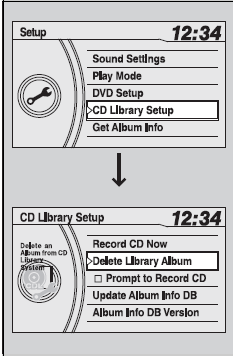
1. Press the SETUP button.
2. Rotate to select CD Library Setup, then press
 .
3. Rotateto select a menu item, then press .
■ To update Gracenote® Album Info
1. Insert the update disc into the disc slot that includes the update.
2. Press the SETUP button.
3. Rotate to select CD Library Setup.
4. Rotate to select Update Album Info DB, then press .
5. Rotate to select Yes. Press to start updating.
CD Library setup menu items Delete Library Album: Delete albums in CD Library.
Rotate to select an album you want to delete and select Yes.
Album Info DB Version: Displays the current album’s database version information.
Update Album Info DB:
To acquire updated files:
Consult a dealer
US: Visit www.honda.com.
Canada: Visit www.honda.ca.
Once you perform an update, any information you edited before will be overwritten or erased.