User Settings Mode
In this mode, you can change the settings of the instrument cluster, doors, lights, etc.
1. Driver Assistance
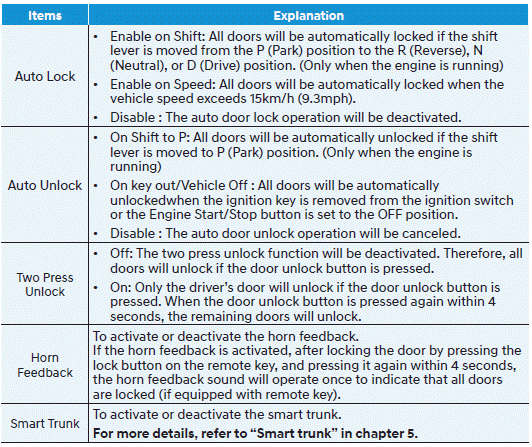
2. Door
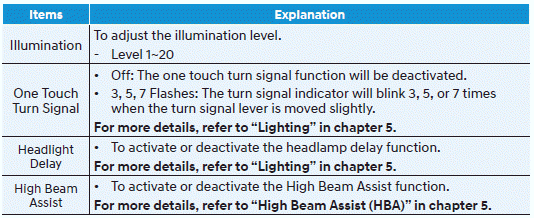
3. Light
4. Sound
5. Convenience
6. Service Interval
7. Theme Select
8. Others
9. Language
10. Reset
Shift to P to edit settings / Apply the parking brake to edit settings
This warning message illuminates if you try to select an item from User Settings mode while driving.
• Intelligent Variable Transmission: For safety, change the User Settings after parking the vehicle, applying the parking brake, and shifting the shift lever to P (Park).
Quick Guide (Help)
This mode provides brief instructions for the system in User Settings mode. Select an item, then press and hold the OK button.
Information
When using the infotainment system, only the User Settings mode on the infotainment system is supported; the User Settings mode on the instrument cluster is not supported.
1. Driver Assistance
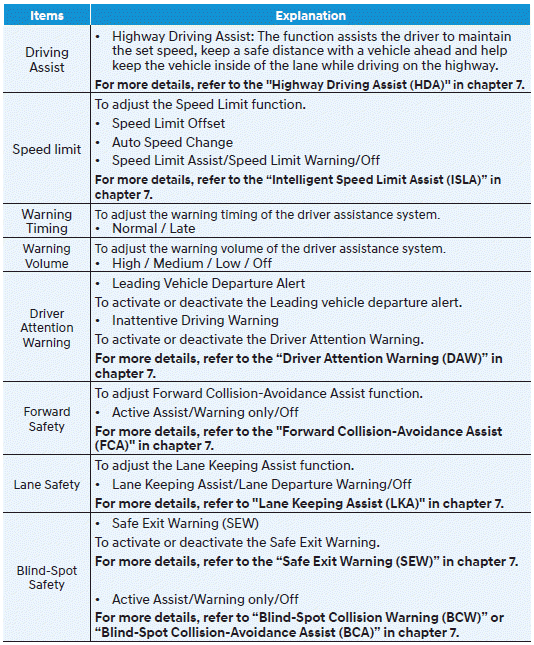
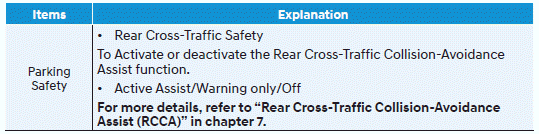
2. Door
3. Light
4. Sound
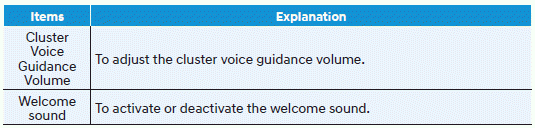
5. Convenience
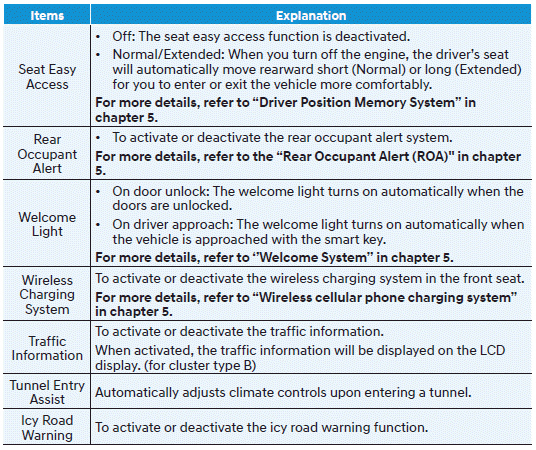
6. Service Interval

To use the service interval menu, contact an authorized HYUNDAI dealer.
If the service interval is activated and the time and distance are adjusted, the message is displayed in the following situations each time the vehicle is started.
-- Service In
: Displayed to inform the driver of the remaining distance and number of days until service.
-- Service Required
: Displayed when the distance and days until service have been reached or exceeded.
Information
If any of the following conditions occur, the distance and days until service may be incorrect.
-- The battery cable is disconnected.
-- The fuse switch is turned off.
-- The battery is discharged.
7. Theme Select
To select the graphic style of the instrument cluster and adjust the settings.
• Theme A / Theme B / Theme C
8. Others
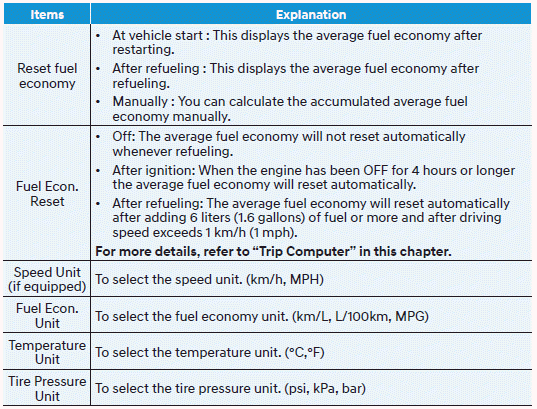
9. Language

10. Reset

Test yourself
A quick Hyundai Elantra CN7 quiz: every answer comes with an explanation and a link to the manual page.