The wireless charging system receives battery voltage while in ACC or IG ON and transmits 5 W output power to a mobile phone. Mobile phones certified to the WPC (Qi 1.1.2) wireless charging standard or equipped with an exclusive wireless charging case are supported.
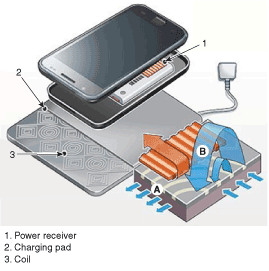
Power receiver: Built into the secondary coil to receive induced current from the charging pad.
Charging pad: Electric coils are wound inside a plastic cover.
Coil: Rectangular and round coils generate various electromagnetic fields.
A.
Supply power to the charging pad to generate an electromagnetic field in the coil.
B.
The current induced by electromagnetic induction is directed to the power receiver to charge the battery.
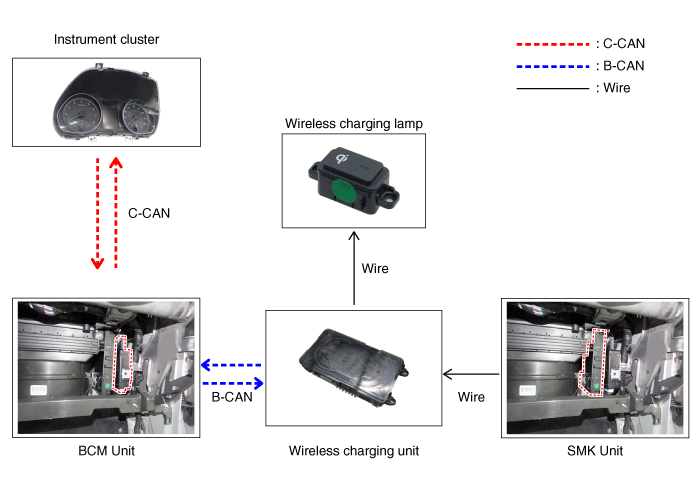
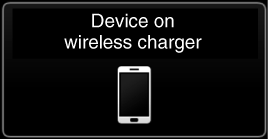
Instrument Cluster: Mobile phone contact warning
BCM: Detects communication with the mobile phone
Wireless charging indicator: Displays the charging status
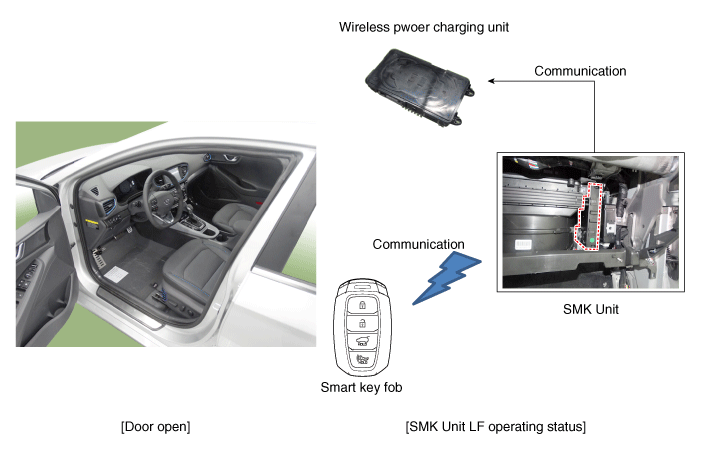
SMK unit: Stops charging during LF activation
Charging Function
Activation Method
a.
Close all vehicle doors.
b.
Turn the vehicle power to ACC or IG ON.
b.
Place a wireless charging-compatible mobile phone on the tray.
Charging Status Display
Mode
Charging LED Display
Notes
Charging Ready
LED off
Charging in progress
Yellow LED on
Charging complete
Green LED on
Charging error
Yellow LED flashing
Flashes 10 times over 10 seconds, then the LED turns off for 50 seconds (60 seconds total)
Mobile Phone Contact Warning
Activation Method
a.
Key OFF while charging the mobile phone.
b.
Checks whether the mobile phone is connected to the wireless charging unit.
b.
A warning message for mobile phone contact is displayed on the instrument cluster (approximately 4–5 seconds).
Overheating Prevention
Activation Method
a.
If the temperature of the thermistor inside the wireless charging module rises above a specified level (158 °F (70 °C)), charging stops to protect the mobile phone battery.
b.
If the thermistor temperature drops below a specified level (149 °F (65 °C)), charging resumes.
Foreign Object Detection
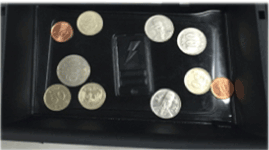
Charging stops if a coin or other metal object is between the wireless charger and the mobile phone. [Foreign Object]
After the system detects a foreign object and stops charging the mobile phone, charging resumes approximately 60 seconds after the foreign object is removed.
SMK Frequency Interference Prevention Unit: This function prevents interference between the wireless charging frequency and the smart key frequency band.
Wireless charging stops when a door is open or the SMK unit is in LF mode (smart key search). For example, the wireless charging function stops if the driver takes the smart key out of the vehicle while the ignition is on.
It returns to normal operation when the LF mode of the SMK is finished.
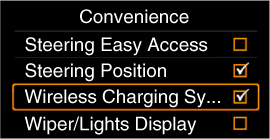
Turn the wireless charging function on or off using the USM.※ The rear door is applicable to vehicle models equipped with wheels.
System Configuration Diagram / Main Functions of the Wireless Charging System / Protection of the Wireless Charging System
Item
Condition
Status
Protects against low/high voltage
Protects and stops charging when voltage is below 7.0 V or above 16.5 V
LED is off (stops operation)
Charging above 7.5 V and below 16.0 V
Protects against reverse voltage
Protects and stops charging in case of reverse voltage
LED is off (stops operation)
Protects against overcurrent
Protects and stops charging when 4.5 A is detected
Yellow LED flashing
Protects against overheating
Protects and stops charging when the internal temperature sensor of the wireless charging module detects 158°F (70°C)
Yellow LED flashing
Resumes when temperature is below 149°F (65°C)
Foreign object (coins, paper clips, precious metals, etc.)
Protects and stops charging when a foreign object is detected (overheating prevention)
Yellow LED flashing
Prevents frequency interference
Protects and stops charging when the SMK in the tailgate or trunk is activated with the trunk open
LED is off (stops operation)
Resumes 3.5 seconds after all doors, the trunk and the SMK operation are completed
Mobile Phone Contact Warning
During shutdown when in contact with a mobile phone
Displays a warning message on the instrument cluster (approximately 4-5 seconds)
※ The rear door applies to wagon models.
?
Test yourself
A quick Hyundai Kona quiz: every answer comes with an explanation and a link to the manual page.