Android Auto™
Use this QR code to access the digital experience.
Android Auto™ is a feature of your Uconnect system and your Android™ 5.0 or higher smartphone with a data plan that allows you to project your smartphone and a number of its apps onto the touchscreen radio display. Android Auto™ offers you useful information organized in the form of simple cards that appear exactly when they are needed. Android Auto™ can be used with voice technology, steering wheel controls, knobs and buttons on the radio faceplate, and the radio display touchscreen to control many of your apps. To use Android Auto™, follow this procedure:
NOTE:
Feature availability depends on your wireless carrier and mobile phone manufacturer. Some Android Auto™ features may or may not be available in every region and/or language.
- Download the Android Auto™ app from the Google Play Store on your Android™ smartphone.
- Connect your Android™ smartphone to one of the USB multimedia ports in your vehicle. If the Android Auto™ app was not downloaded, the first time you connect your device the app will begin to download. Your vehicle must be in PARK the first time you use the app.
NOTE:
Be sure to use the factory USB cable that came with your phone, as aftermarket cables may not work.
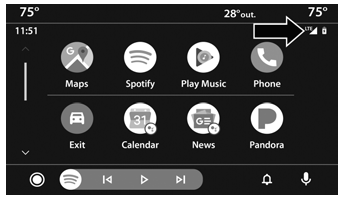
Android Auto™ and LTE Data Coverage
NOTE:
To use Android Auto™, make sure you are in an area with cellular coverage. Android Auto™ may use cellular data, and your cellular coverage is shown in the upper right corner of the radio display. Data plan rates apply.
- When the device is connected and recognized, drag the phone icon from the menu bar to the Android Auto™ icon.
NOTE:
Android Auto™ is set to launch immediately after a compatible device is connected. You can also launch it by pressing the Android Auto™ icon on the touchscreen.
Once Android Auto™ is launched on your Uconnect system, the following features may be used with your smartphone's data plan:
- Google Maps™ for navigation
- Google Play Music, Spotify, iHeartRadio, etc. for music
- Hands-free calling and text messaging for communication
- Various compatible apps
Test yourself
A quick Jeep Wrangler quiz: every answer comes with an explanation and a link to the manual page.