Blind-Spot View Monitor settings
Blind-Spot View Monitor
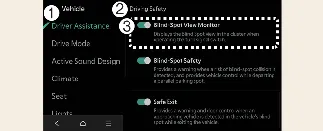
Driver Assistance
Driving Safety
Blind-Spot View Monitor
To manage this feature, power on your Kia Carnival and navigate to Setup → Vehicle → Driver Assistance → Driving Safety → Blind-Spot View Monitor. From this infotainment screen, you can toggle the system on or off according to your preference.
Previous topicBlind-Spot View Monitor (BVM) (if equipped) Next topicBlind-Spot View Monitor operationMore Kia Carnival reference pages
Kia Carnival (KA4) 2022-2026 Owner's Manual: Tire sidewall labeling
The information molded into the sidewall identifies the fundamental characteristics of your Kia Carnival tires and provides the Tire Identification Number (TIN), which is used for safety standard certification and tracking. The TIN is a vital string of characters used to identify specific tires in the event of a safety recall.
Kia Carnival (KA4) 2022-2026 Owner's Manual: Fuses
To safeguard the sophisticated electrical architecture of your Kia Carnival, the vehicle is equipped with various fuses designed to prevent damage from electrical overloads or short circuits. Understanding how to identify and inspect these components is essential for routine owner maintenance. Blade type Cartridge type Multi fuse High voltage fuse * Left side: Normal condition, Right side: Blown (melted) element.