Forward/Side/Reverse Parking Distance Warning settings
Warning Methods
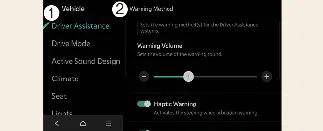
Driver Assistance
Warning Methods
You can customize the Warning Methods while your Kia Carnival is powered on. Access the settings by selecting Setup → Vehicle → Driver Assistance → Warning Methods in the infotainment system menu to modify the following preferences:
Warning Volume: Allows you to tailor the volume level of the audible alerts. Please note that if you choose to turn off or mute the Warning Volume, the system is engineered to revert to a low-volume audible alert to maintain essential safety coverage while operating the Kia Carnival.
 NOTICE
Keep in mind that the Warning Methods configured here may apply universally to other driver assistance systems equipped in your Kia Carnival.
Your preferred Warning Methods settings will be saved and maintained even after the Kia Carnival is turned off and subsequently restarted.
Depending on your specific trim level, features, and software specifications, certain setting menu options may not be available for your Kia Carnival.
 CAUTION
Whenever a trailer is connected electrically to your Kia Carnival, the Reverse Parking Distance Warning system will automatically deactivate. During this time, the PDW system cannot provide distance assistance; therefore, always exercise extreme caution and rely on visual confirmation while reversing (provided the trailer is using a genuine Kia-compatible part).
Parking Distance Warning Auto On
You have the option to set the Parking Distance Warning to activate automatically when traveling at low speeds. To enable this feature, navigate to Setup → Vehicle → Driver Assistance → Parking Safety → Parking Distance Warning Auto On within the infotainment system of your Kia Carnival.
 NOTICE
When the "Parking Distance Warning Auto On" function is actively selected, the indicator light on the Parking Safety button ( ) will remain illuminated to signify that the system is engaged and monitoring.
More Kia Carnival reference pages
Kia Carnival (KA4) 2022-2026 Owner's Manual: Seat warmer (if equipped)
The seat warming system in your Kia Carnival provides rapid and comfortable heat for the front and rear seats, making cold-weather driving significantly more pleasant. Front seat (Type A): Front seat (Type B): Rear seat: With the ENGINE START/STOP button in the "ON" position, operate the corresponding levers or buttons to activate the desired seat warming level.
Kia Carnival (KA4) 2022-2026 Owner's Manual: Owner maintenance
The following checklists provide routine inspections that should be conducted by the owner or an authorized Kia dealer at the indicated frequencies to ensure the safe and dependable operation of your Kia Carnival. Any irregularities or adverse conditions identified during these checks should be reported to your local dealer as soon as possible for professional evaluation.