Highway Driving Assist settings
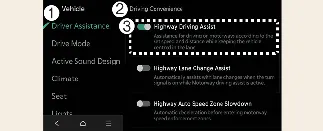
Driver Assistance
Driving Convenience
Highway Driving Assist
With your Kia Carnival powered on, you can manage these settings by selecting Setup → Vehicle → Driver Assistance → Driving Convenience on the infotainment system. From here, you can toggle and customize each function to suit your preferences.
When the Highway Driving Assist feature is enabled, your Kia Carnival will automatically manage your following distance, maintain your target speed, and provide steering torque to help keep the vehicle centered in your lane.
Highway Lane Change Assist (if equipped)
When the "Highway Lane Change Assist" feature is enabled in your Kia Carnival, the system provides intelligent steering support to help you perform lane changes safely and smoothly while cruising on the highway.
 WARNING
For your safety and to prevent distractions, please only adjust these configuration settings while your Kia Carnival is parked in a secure, stationary location.
 CAUTION
If your Kia Carnival is electrically connected to a trailer, the Highway Driving Assist (HDA) system will automatically deactivate. In this mode, the Kia Carnival will not provide steering or speed support; please remain attentive and drive with increased caution. (Applicable if a genuine Kia towing component is equipped).
 NOTICE
The core "Highway Driving Assist" function must be enabled in the settings menu for "Highway Lane Change Assist" to be available for use.
Should the system detect a functional error, configuration changes will be locked. Please have your Kia Carnival inspected by an authorized Kia dealer if this occurs.
Your Kia Carnival is designed to retain your preferred driver assistance settings, so these functions will maintain their last state even after the vehicle is turned off and restarted.
Warning Methods

Driver Assistance
Warning Methods
You can fully customize your Kia Carnival alert preferences while the vehicle is powered on. Navigate through your infotainment system to Setup → Vehicle → Driver Assistance → Warning Methods to adjust the following:
Driving Safety Priority: When active, this feature automatically reduces the volume of your media or other audio sources whenever a safety warning is triggered by the Kia Carnival.
 NOTICE
Please be aware that adjustments made to "Warning Methods" may also apply to other driver assistance systems throughout your Kia Carnival.
The Kia Carnival will automatically save your warning preferences, ensuring they persist across different driving sessions.
Menu availability and specific feature options may vary based on your Kia Carnival trim level and regional hardware specifications.
More Kia Carnival reference pages
Kia Carnival (KA4) 2022-2026 Owner's Manual: Forward/Reverse Parking Distance Warning (PDW) (if equipped)
The Forward/Reverse Parking Distance Warning (PDW) system in your Kia Carnival utilizes a series of front and rear ultrasonic sensors. These sensors detect obstacles—such as people, animals, or nearby objects—and provide audible and visual warnings to help you maintain a safe distance when your Kia Carnival is stopped or maneuvering at low speeds.
Kia Carnival (KA4) 2022-2026 Owner's Manual: Blind-Spot View Monitor (BVM) (if equipped)
Left View Right View The Blind-Spot View Monitor (BVM) in your Kia Carnival provides enhanced situational awareness by streaming a live feed of your rear blind spots directly into the instrument cluster whenever your turn signal is activated, significantly improving lane change safety. Detecting sensor Wide-side-view camera/Outside mirror