Using power liftgate automatic close feature
Using power liftgate automatic close feature
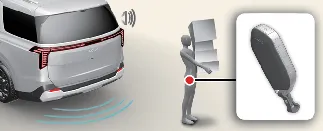
With the liftgate open, stand within the detection zone—approximately 50 to 100 cm (20 to 40 inches) directly behind the liftgate—while carrying your authorized smart key. Wait for approximately 3 seconds until the system chime sounds.
Walk away from the Kia Carnival with the smart key. The system will detect your departure, sound a chime, and the liftgate will close automatically.
Setting Power liftgate automatic close
With the engine running, manage this feature via the infotainment system: Setup → Vehicle → Door → Power Liftgate. You can toggle "Power Liftgate Auto Close" on or off to suit your needs.
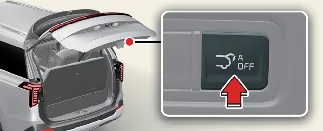
You can also temporarily disable the feature by pressing the automatic close release button while the liftgate is in the open position.
 NOTICE
Infotainment menu layouts may change due to software updates. For the most accurate, model-specific instructions, consult the digital user's manual in your Kia Carnival or the printed quick reference guide.
Previous topicSetting the power liftgate Next topicLiftgate Auto Close (if equipped)More Kia Carnival reference pages
Kia Carnival (KA4) 2022-2026 Owner's Manual: Surround View Monitor (SVM) (if equipped)
The Surround View Monitor (SVM) for the Kia Carnival is designed to assist you during complex parking maneuvers by providing a comprehensive, bird's-eye perspective of the area immediately surrounding your vehicle. Detecting sensor The Kia Carnival Surround View Monitor utilizes several high-definition cameras to provide a seamless image: 1.
Kia Carnival (KA4) 2022-2026 Owner's Manual: Recommended lubricants and capacities
To ensure peak engine performance, long-term powertrain durability, and optimal fuel economy, it is vital to utilize only high-quality, manufacturer-approved lubricants for your Kia Carnival. Following these guidelines helps maintain your vehicle’s warranty and operational longevity. Lubricant Volume Classification Engine oil (drain and refill) 6.