Rear Cross-Traffic Collision-Avoidance Assist settings
Rear Cross-Traffic Safety
Driver Assistance
Parking Safety
Rear Cross-Traffic Safety
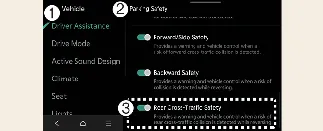
With your Kia Carnival powered on, you can configure this feature by selecting Setup → Vehicle → Driver Assistance → Parking Safety → Rear Cross-Traffic Safety on the infotainment screen. This menu allows you to enable or disable the Rear Cross-Traffic Collision-Avoidance Assist (RCCA) system according to your preference.
 WARNING
For your protection, the Rear Cross-Traffic Collision-Avoidance Assist system will automatically activate every time you restart the Kia Carnival. If you choose to deactivate Rear Cross-Traffic Safety after a restart, you must remain hyper-vigilant and always monitor your surroundings manually while reversing.
 CAUTION
Within the settings menu, you have the option to enable or disable steering wheel vibration alerts.
When a trailer is electrically connected to your Kia Carnival, the Rear Cross-Traffic Collision-Avoidance Assist system will automatically deactivate to prevent false readings. In this scenario, the system will not provide collision warnings or braking assistance. Always exercise extra caution while towing.
Warning Methods
Driver Assistance
Warning Methods
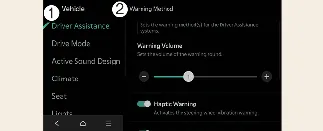
You can customize how your vehicle alerts you while the Kia Carnival is powered on. Navigate to Setup → Vehicle → Driver Assistance → Warning Methods in the infotainment settings to adjust the following:
Warning Volume: Allows you to customize the intensity of the audible alert sounds.
Haptic Warning: Toggles the physical steering wheel vibration feature, providing a tactile alert alongside the visual and audible signals.
 NOTICE
Please note that the warning preferences selected here may apply globally to other driver assistance systems within your Kia Carnival.
The system will remember your last configured warning preferences, even after the vehicle is turned off and restarted.
Depending on the specific trim level and software version of your Kia Carnival, some menu options may vary or be unavailable.
To ensure you are always alerted, the Warning Volume and Haptic Warning cannot be completely disabled at the same time; if one is turned off, the other must remain active.
More Kia Carnival reference pages
Kia Carnival (KA4) 2022-2026 Owner's Manual: Interior lights
Your Kia Carnival is equipped with a comprehensive interior lighting system designed to provide visibility and comfort throughout the cabin. CAUTION To avoid draining the vehicle battery, avoid using interior lights for extended periods when the engine is not running. WARNING Do not use interior lights while driving in dark conditions.
Kia Carnival (KA4) 2022-2026 Owner's Manual: Keys
WARNING Never leave your keys inside the Kia Carnival while children are present without adult supervision. Leaving children unattended in a vehicle equipped with a smart key system is extremely dangerous. Children may mimic adult actions, potentially placing the key in position and pressing the ENGINE START/STOP button. An active key could enable children to operate power windows, adjust other controls, or even shift the vehicle into gear, which could result in serious bodily injury or death.