Safe Exit Assist settings
Safe Exit
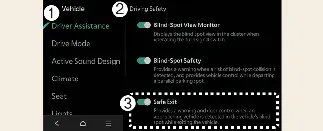
Driver Assistance
Safe Exit
With the vehicle powered on, you can configure your preferences by navigating to Setup → Vehicle → Driver Assistance → Driving Safety → Safe Exit on the Kia Carnival infotainment system.
 WARNING
The driver should always remain aware of their surroundings. If the Exit Safety function is deselected in the settings, the Kia Carnival Safe Exit Assist system will be unable to provide protective alerts or door control.
 CAUTION
If your Kia Carnival is electrically connected to a trailer (using genuine Kia parts), the Safe Exit Assist system automatically deactivates. In this mode, the system will not provide assistance; please exercise extra care when exiting the vehicle.
 NOTICE
Your Kia Carnival is designed to retain your last Safe Exit Assist settings, ensuring the system remains configured to your preference even after the vehicle is turned off and restarted.
Warning Methods

Driver Assistance
Warning Methods
You can customize how the Kia Carnival warns you by selecting Setup → Vehicle → Driver Assistance → Warning Methods:
Warning Volume: Adjusts the loudness of the alert. If set to off, the system may still warn you at a lower volume for your safety.
Driving Safety Priority: Automatically lowers other audio volumes in your Kia Carnival when a safety warning is triggered.
 NOTICE
Be aware that these Warning Methods may also apply to other driver assistance features throughout your Kia Carnival.
The settings are persistent and will be maintained after restarting the vehicle.
The availability of these menus may vary based on the specific trim and technical specifications of your Kia Carnival.
More Kia Carnival reference pages
Kia Carnival (KA4) 2022-2026 Owner's Manual: Personalized Profile and Vehicle Settings
When a registered smartphone is linked to a user profile in your Kia Carnival, the vehicle will automatically apply personalized settings (such as seat position, mirror angles, and climate control) the moment you unlock the door using your digital key. This convenient feature allows for a total of two unique driver profiles to be linked. Note that infotainment interface layouts may shift after system updates; always check the quick reference guide provided with your vehicle for specific model-year instructions.
Kia Carnival (KA4) 2022-2026 Owner's Manual: Tire sidewall labeling
The information molded into the sidewall identifies the fundamental characteristics of your Kia Carnival tires and provides the Tire Identification Number (TIN), which is used for safety standard certification and tracking. The TIN is a vital string of characters used to identify specific tires in the event of a safety recall.