Smart Cruise Control settings
Smart Cruise Control
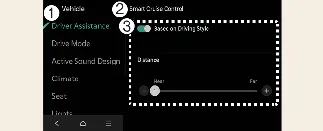
With your Kia Carnival powered on, you can fine-tune your driving experience by selecting Setup → Vehicle → Driver Assistance → Smart Cruise Control via the infotainment system. This menu allows you to adjust your preferred vehicle following distance, acceleration responsiveness, and the system's reaction speed to suit your driving preferences.
Based on driving style
Driver Assistance
Smart Cruise Control
Based on Driving Style
With your Kia Carnival powered on, you can enable a more personalized driving experience. By navigating to Setup → Vehicle → Driver Assistance → Smart Cruise Control → Based on Driving Style on the infotainment screen, the system will calibrate the Smart Cruise Control (SCC) behavior to align with your unique driving habits—specifically regarding inter-vehicle distance, acceleration profiles, and response speeds.
Furthermore, these driving parameters can be fine-tuned manually to better suit your preferences.
 NOTICE
If your Kia Carnival is equipped with advanced SCC features, you may choose between "Based on Driving Mode" and "Based on Driving Style" within the Setup → Vehicle → Driver Assistance → Smart Cruise Control menu.
While the Smart Cruise Control is active in "Based on Driving Style" mode, pressing and holding the Vehicle Distance button (
 ) will disable the mode. To re-enable "Based on Driving Style," press and hold the same Vehicle Distance button (
 ) again.
The Kia Carnival SCC system dynamically learns and refines your driving style continuously while the vehicle is in motion.
When "Based on Driving Style" is deactivated, the system retains your previously learned driving parameters (distance, acceleration, response) as the baseline.
Please note that the visual indicators for inter-vehicle distance and response speed may shift depending on whether the "Based on Driving Style" feature is toggled on or off, reflecting the transition between different control logic modes.
More Kia Carnival reference pages
Kia Carnival (KA4) 2022-2026 Owner's Manual: Head-Up Display (HUD) (if equipped)
The Head-Up Display (HUD) in your Kia Carnival is an advanced driver-assistance feature that projects key information—such as vehicle speed, navigation guidance, and safety alerts—directly onto the windshield. This allows you to monitor critical data without taking your eyes off the road. Optimal Visibility Factors: The HUD image may become difficult to view under certain conditions: Incorrect seating posture or eye level.
Kia Carnival (KA4) 2022-2026 Owner's Manual: Forward/Side/Reverse Parking Distance Warning (PDW) (if equipped)
The Forward/Side/Reverse Parking Distance Warning (PDW) system in your Kia Carnival utilizes a comprehensive array of front, side, and rear ultrasonic sensors. This advanced system is designed to detect and alert you if pedestrians, animals, or various objects are within a specified distance, ensuring safety whether your Kia Carnival is at a complete stop or maneuvering at low speeds.