Using the infotainment/climate switchable controller
Your Kia Carnival is equipped with an innovative switchable control panel that allows you to manage both the infotainment system and climate settings using the same physical interface. This space-saving design ensures a clutter-free dashboard while keeping essential controls within easy reach.

Simply press the main button on the controller to toggle between the Infotainment and Climate Control modes. To define your preferred starting point, press and hold the button to select the default control panel mode that activates upon starting your Kia Carnival.
Switching between panels
Infotainment control panel: 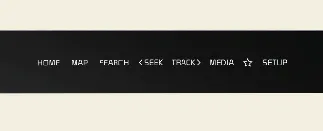
Climate control panel: 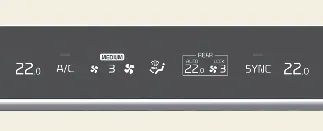
When you press the button, the system will highlight the selected icon on the display, and the controller knobs will instantly update their function. The knob display will illuminate in a specific color or style corresponding to the active mode, providing visual confirmation of your selection. Note that when the vehicle is in ACC (Accessory) mode, only the infotainment system is enabled to conserve battery power.
Setting the default mode
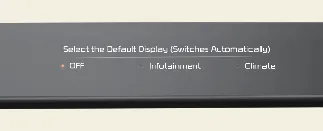
To personalize your experience, press and hold the toggle button to access the settings menu. You can choose which panel remains active by default. Once configured, if you manually switch modes, the system will automatically revert to your chosen default mode after a preset period of inactivity. If you set the preference to 'OFF', the system will simply retain the most recently used mode.
Previous topicManual climate control system (if equipped) Next topicHeating and air conditioningMore Kia Carnival reference pages
Kia Carnival (KA4) 2022-2026 Owner's Manual: Tire sidewall labeling
The information molded into the sidewall identifies the fundamental characteristics of your Kia Carnival tires and provides the Tire Identification Number (TIN), which is used for safety standard certification and tracking. The TIN is a vital string of characters used to identify specific tires in the event of a safety recall.
Kia Carnival (KA4) 2022-2026 Owner's Manual: Safe Exit Warning (SEW) (if equipped)
The Safe Exit Warning (SEW) system is a convenient safety feature designed for your Kia Carnival. While the vehicle is stopped, if the rear corner radar detects a vehicle approaching from the rear, and a passenger attempts to open a door, the system will issue a warning message and an audible alert to help prevent a potential collision. CAUTION Please note that the warning timing may vary depending on the speed of the approaching vehicle; always perform a visual check before exiting your Kia Carnival.