Charging and climate
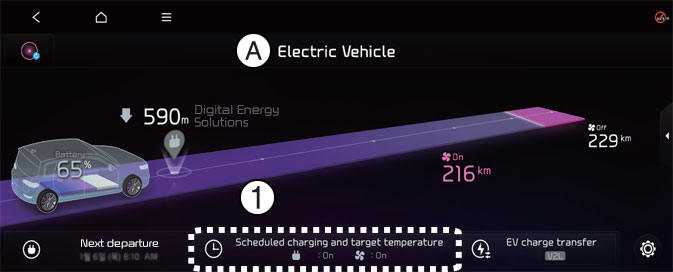
A: Electric Vehicle
- Scheduled charging and target temperature
Select EV → Scheduled charging and target temperature on the screen.
NOTICE
Vehicle must be connected with the charging connector at the time prescheduled time for the scheduled charging.
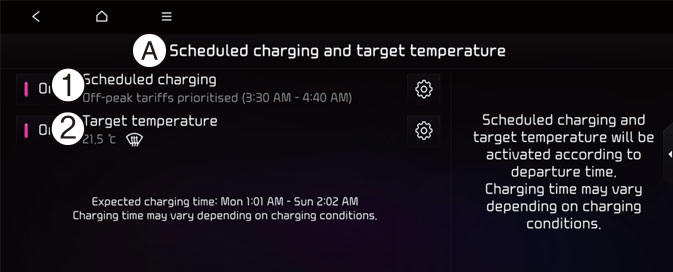
A: Scheduled charging and target temperature
- Scheduled charging
- Target temperature
You can set the date and time of when to charge the battery and the climate control temperature. Also, you may select the time to start charging using the Off-peak time settings.
Off-peak time settings
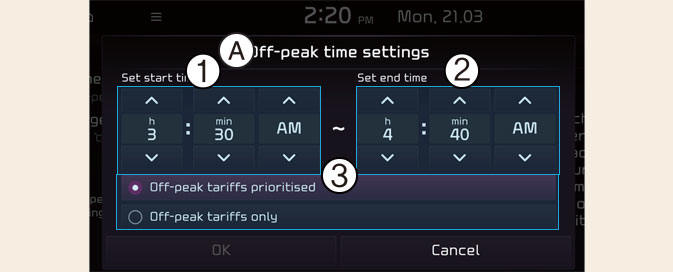
A: Off-peak Hours Settings
- Start Time
- End Time
- Charging options
- If selected, starts charging only on the designated off-peak time. If deselected, starts charging only on the scheduled time.
- Set the most inexpensive time to complete charging.
- Off-peak tariffs prioritised: If selected, starts charging at offpeak time (may keep on charging pass off-peak time to charge 100%).
- Off-peak tariffs only: If selected, charges only within off-peak time (may not charge 100%).
Target temperature Settings
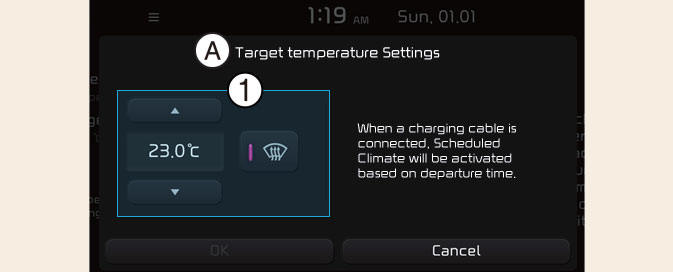
A: Target temperature Settings
- Target temperature
If the target temperature (1) is set with the cable connected, the cabin temperature will be adjusted to the target temperature at departure time. In cold weather, pre-scheduled heating helps enhance electric vehicle performance by heating the vehicle in advance.
NOTICE
The infotainment system may change after software updates. For more information, refer to the manual provided in the infotainment system and the quick reference guide.