Features of your vehicle
Head-Up Display (HUD)
In this manual: Features of your vehicle
11steps
~66min
3/5difficulty
Done 0 of 11
The Head-Up Display is a transparent display that projects an image of certain information from the instrument cluster and navigation system on the windshield glass.
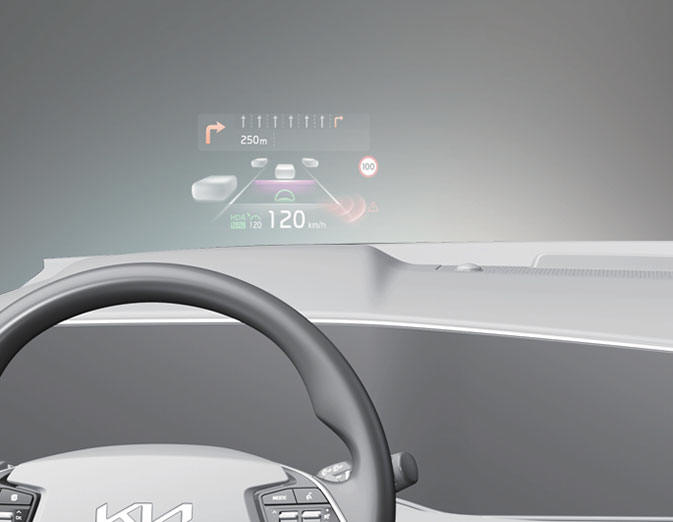
- The head up display image on the HUD screen may be invisible when:
- Sitting posture is bad.
- Wearing a polarized sunglasses.
- There is an object on the cover of the head up display.
- Driving on a wet road.
- An inadequate lighting is turned on inside the vehicle.
- Any light comes from the outside.
- Wearing an inadequate glasses to your eyesight.
- If the head up display image is not shown well, adjust the height, rotation or illumination of the head up display in the LCD display.
- When the head up display needs inspection or repair, Kia recommends to visit an authorized Kia dealer/service partner.
WARNING
Head-Up Display
- Do not make the front windshield glass have window tint or other types of metallic coating. Otherwise, the Head-Up Display image may be invisible.
- Do not place any accessories on the crash pad or attach any objects on the windshield glass.
- As Blind-Spot Collision Warning is a supplemental device for your safe driving, it may be dangerous to rely on only the BCW information of the Head-Up Display image when changing the lane. Always pay attention to drive safely.
CAUTION
When replacing the front windshield glass of the vehicles equipped with the Head-Up Display, replace it with a windshield glass designed for the Head-Up Display operation. Otherwise, duplicated images may be displayed on the windshield glass.
Head Up Display Information
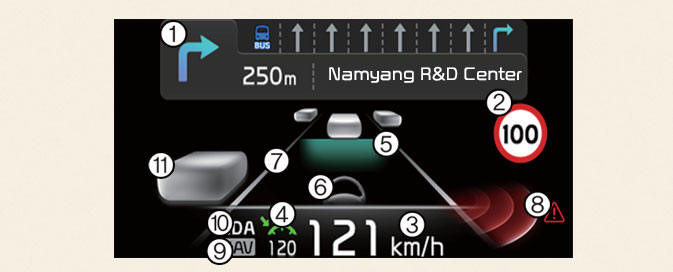
- Turn By Turn navigation information (if equipped)
- Road signs
- Speedometer
- SCC set speed information (if equipped)
- SCC vehicle distance information (if equipped)
- Lane Following Assist information (if equipped)
- Lane Safety information (if equipped)
- Blind-Spot Safety information (if equipped)
- Highway Driving Assist information (if equipped)
- Highway Auto Speed Change information (if equipped)
- Surrounding vehicle information
NOTICE
Road Signs and Turn By Turn navigation information are available depending on the region.
Head-Up Display Setting
On the LCD display, you can change the head up display settings as follows. 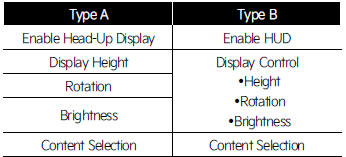
* For more details, refer to "User settings mode"
Was this page helpful?