Instrument cluster
Contents:
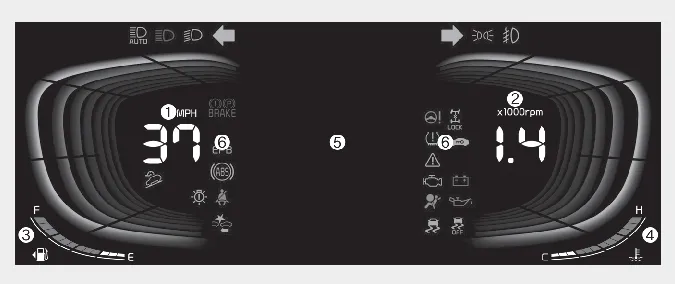
Type A
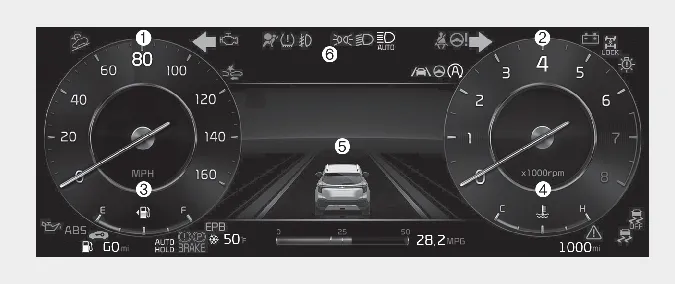
Type B
* The actual instrument cluster in your Kia Seltos may differ from the illustration depending on trim level, market, and vehicle specifications.
Speedometer
Tachometer
Fuel gauge
Engine coolant temperature gauge
LCD display
Warning and indicator lights
Instrument cluster ➤
Adjusting instrument cluster illumination

 WARNING
Never adjust the instrument cluster settings or illumination while driving. Doing so may distract the driver, cause loss of control, and lead to an accident that may result in death, serious injury, or property damage.
The brightness of the Kia Seltos instrument panel illumination can be changed by pressing the illumination control switch marked "+" or "-" when the ignition switch or ENGINE START/STOP button is ON, or when the taillights are turned on.
If you hold the illumination control switch marked "+" or "-", the brightness will change continuously.
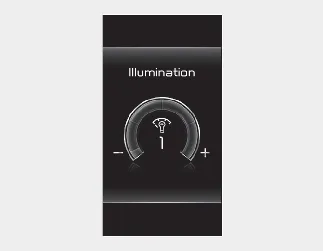
If the brightness reaches the maximum or minimum level, an alarm will sound.
Gauges
The gauges in the Kia Seltos display important driving information, including vehicle speed, engine speed, fuel level, coolant temperature, and other essential operating details. Check the gauges regularly while driving to stay aware of the vehicle's condition.
Outside temperature gauge ➤
Transmission shift indicator
The transmission shift indicator displays gear information according to the transmission type installed in your Kia Seltos. This information helps the driver confirm the current gear position at a glance.