Based on Drive Mode
Contents:
Based on Drive Mode
Smart Cruise Control acceleration response may change according to the Drive Mode selected through the Drive Mode integrated control system. Refer to the following chart for Kia Seltos SCC behavior by mode.
Drive Mode | Smart Cruise Control |
|---|---|
NORMAL |
Normal |
SMART |
Normal |
SPORT |
Fast |

NOTICE
For more details about Drive Mode, refer to More Details.
In vehicles without Drive Mode, Smart Cruise Control accelerates the vehicle at the 'Normal' level.
Warning Methods
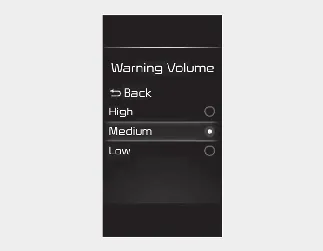
You can adjust the Warning Methods with the ignition switch or ENGINE START/STOP button in the ON position.
Warning Volume: Select User Settings → Driver Assistance → Warning Volume on the LCD display, or select Setup → Vehicle → Driver Assistance → Warning Methods on the infotainment system.
Driving Safety Priority: Select Setup → Vehicle → Driver Assistance → Warning Methods → Driving Safety Priority on the infotainment system. For safer driving, the audio volume may temporarily decrease so the driver can hear the audible warning more clearly.

NOTICE
The Warning Methods you select may also apply to the warning volume of other ADAS functions in the Kia Seltos.
Warning Methods will keep the last selected setting even if the vehicle is restarted.
The setting menu may not be available depending on vehicle features, trim level, and specifications.